

Amazon integration & marketplace
automation
Commercium connects Amazon Seller Central to your ecommerce store, ERP, OMS, WMS, shipping and accounting systems over the Amazon Selling Partner API, products, inventory, orders, shipments, cancellations, refunds and settlements, for FBA and FBM in the same account.
28-day free trial. No credit card. Authorise Commercium in Seller Central, we never ask for your Amazon password.
What Commercium solves for Amazon sellers
Commercium connects Amazon with e-commerce, OMS, ERP, WMS, shipping and accounting platforms, so product, inventory, order, shipment and settlement data stay in step.
Your systems
Store · ERP · OMS · WMS · 3PL
Maps, transforms, routes, validates & retries every Amazon flow
Amazon
Seller Central · SP-API
Two fulfilment models, one Seller Central
Amazon measures sellers on stock accuracy, on-time dispatch and valid tracking. Without an integration, all of that runs on uploads, downloads and someone’s spreadsheet.
E-commerce platforms
Connecting Amazon with your store lets you list your store catalogue on Amazon, then run one product set and one stock pool across both.
ERP systems
Connecting your ERP turns Amazon orders into sales orders and keeps stock, cost and finance as the single source of truth.
OMS, WMS & 3PL
Connecting your warehouse or 3PL routes each FBM order, Prime orders first, to the facility that can ship it on time.
Shipping & carriers
Connecting shipping gets labels and tracking into Amazon’s shipment confirmation, whether you ship yourself or use Easy Ship.
Accounting platforms
Connecting accounting keeps every Amazon sale, fee, refund and payout matched to your books.
Other channels & POS
Connecting your other marketplaces and POS brings every sale into the same stock pool, so an Amazon FBM order never oversells another channel.
Click the platform you want to integrate with Amazon
The same integration types as the Amazon hub, e-commerce, OMS, ERP, POS, accounting, shipment, support ticketing and 3PL, with live connections from Commercium.
E-Commerce Platforms
OMS Platforms
ERP Platforms
POS Platforms
Accounting Platforms
Shipment Platforms
Support Ticketing Platforms
3PL Platforms
Product, data & price
Inventory
Orders
Shipment & fulfilment
Cancellations & refunds
Settlements & finance
Commercium supports 200+ marketplaces, ecommerce platforms, ERPs, shipping providers, accounting systems and fulfilment platforms, most of them connectable on your existing plan.
From demo to a live Amazon Seller channel
Seven steps from the first conversation to a controlled go-live, credentials, platform connections, mapping and a real order dry run before your catalogue goes live.
Book a Demo & Scope the Setup
Tell us what you sell wholesale, which systems hold your catalogue, stock, orders, and finance data, and whether you run Amazon Seller alongside a DTC store or other marketplaces. We’ll walk through the entire integration on a live call and explain exactly what your setup will look like.
Get Your Amazon Seller Access Ready
Commercium connects to Amazon Seller Central through secure authorization, so there are no API keys to generate or copy. You approve the connection directly in Amazon Seller Central during setup. It takes about 2 minutes, and you need the main/owner login for your Amazon Seller account.
- Make sure you can log in to Amazon Seller Central with the main/owner account. Authorization from a secondary user may not have the right permissions.
- Note the country/marketplace of your Amazon Seller account, for example United States, United Kingdom, or India. You’ll select it in Commercium in Step 5 and must choose the same one in Seller Central.
- Keep Seller Central handy. You’ll log in and click Authorise during Step 5.
Log In to the Commercium Portal
- Go to the Commercium portal at app.mycommercium.com.
- Enter your email address and password.
- Click Log In.
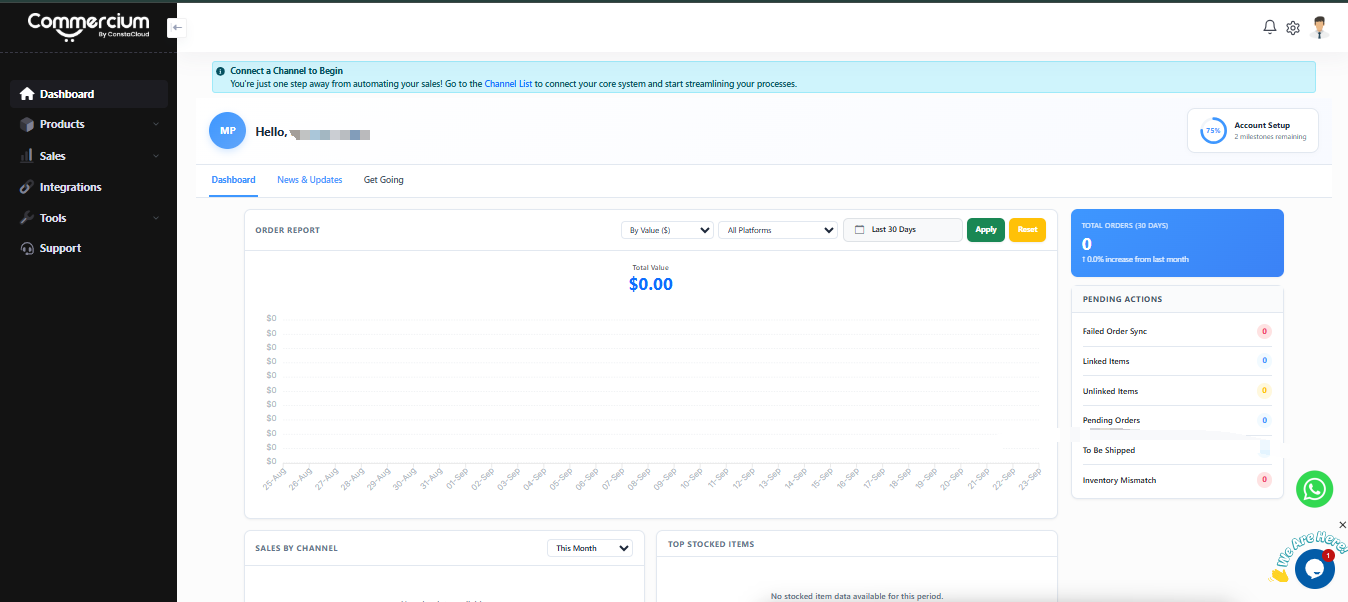
If you don’t have an account yet, contact [email protected]. After logging in, you’ll land on your Commercium dashboard. The left sidebar includes Dashboard, Products, Sales, Integrations, Tools, and Support.
Choose Your Source of Truth
Your source of truth is where your products, inventory and prices are managed, and CommerceHub OrderStream syncs from it. You have two options:
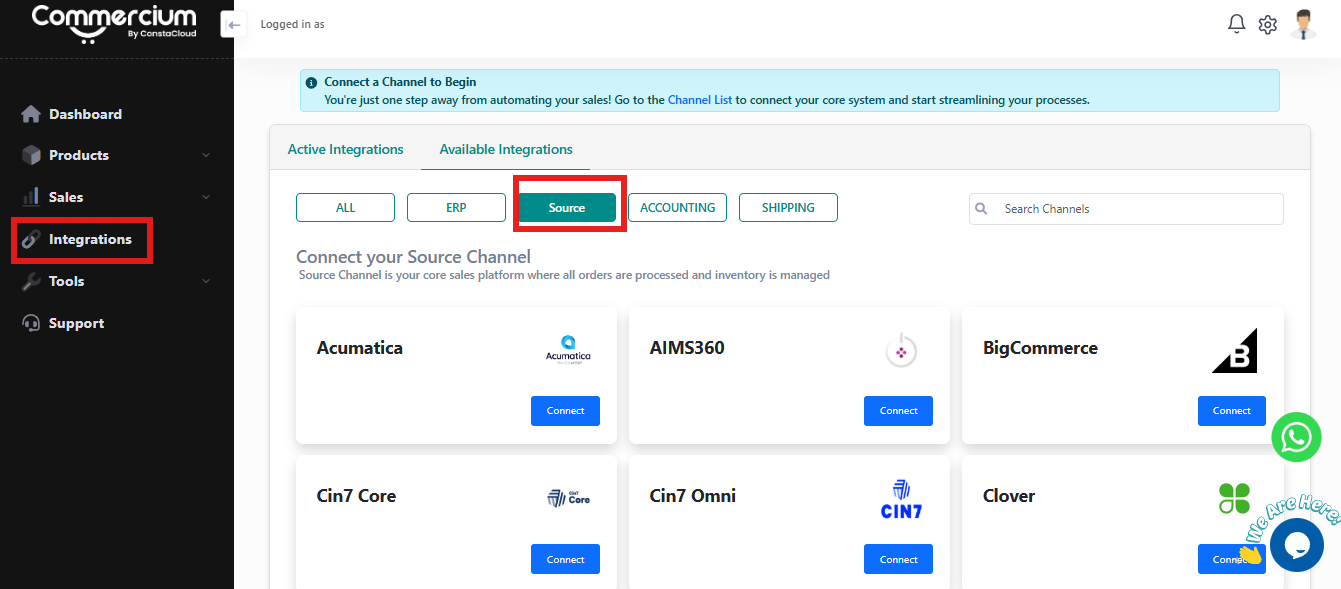
- In Commercium, go to Integrations and select Available Integrations.
- Select your source platform.
- Enter the credentials your platform asks for and click Connect.
Connect Amazon in Commercium
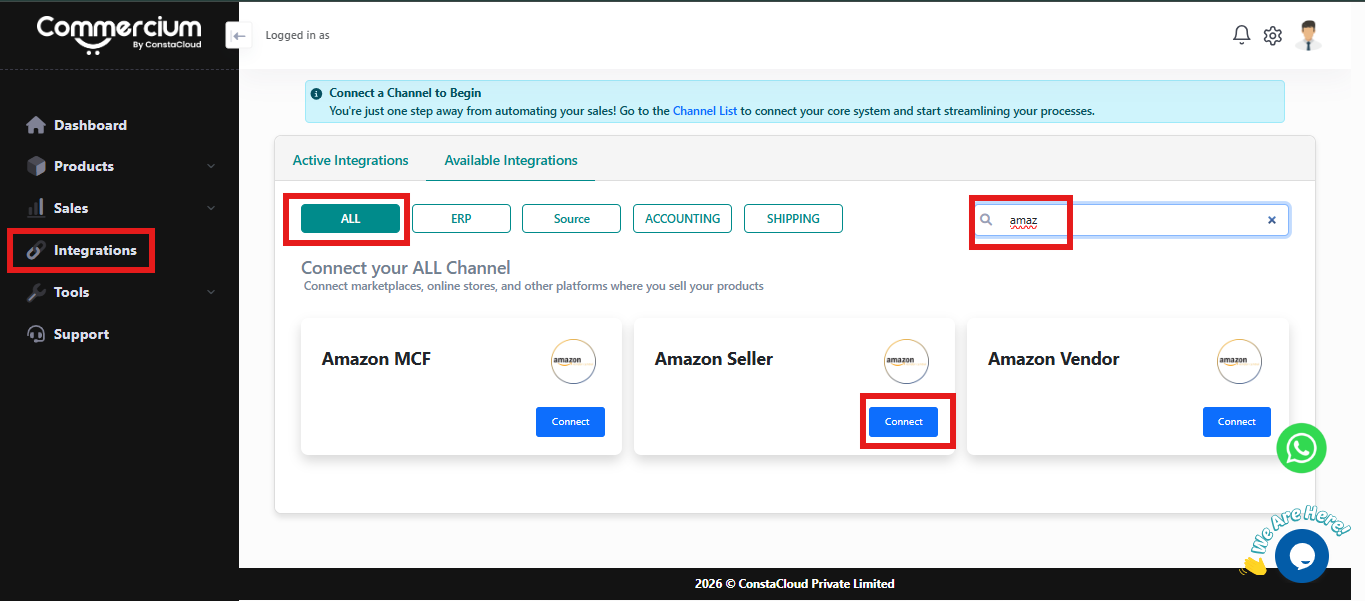
- In the left sidebar, click Integrations.
- Select the Integrations tab.
- Switch to Available Integrations .
- Click the “All” toggle in the top left corner.
- Type Amazon in the search bar on the right.
- On the Amazon card, click Connect.
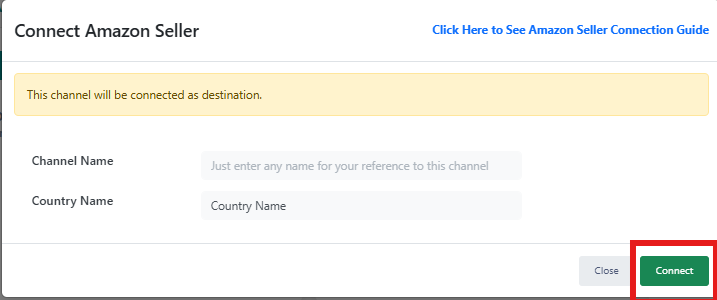
- In the Channel Name field, enter a name for this connection, such as “Amazon Marketplace.” This name is only for your reference inside Commercium.
- Enter your API key, Shop ID and base URL from Step 2, then click the green Connect button.
- The connection will be validated immediately.
Nothing is published to Amazon until you switch product sync on, so you can review everything first. Once connected, your Amazon channel appears under the Active Integrations tab .
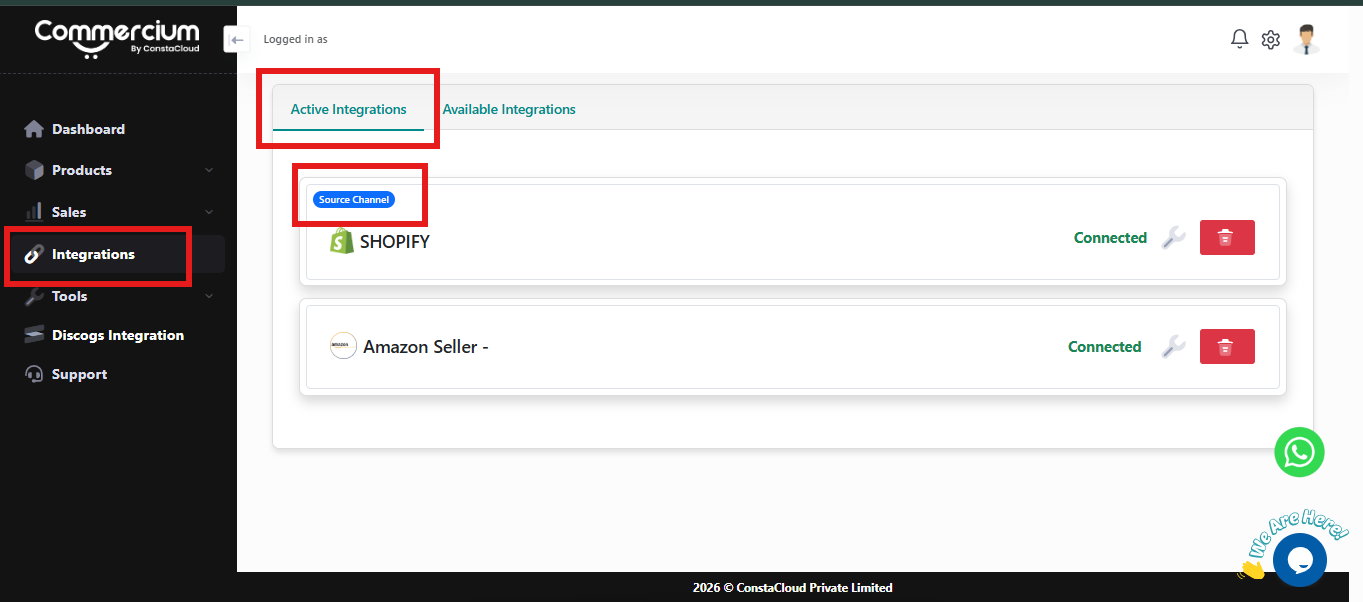
Map Catalogue, Pricing & Operations
We map everything once so that every listing and order follows the same rules, including SKU identity, Amazon categories and attributes, variants and prepacks, wholesale and retail pricing, order minimums, warehouses, carriers, tax treatment, and how commissions and fees are posted to your books.
Test, Publish & Go Live
We import and link your existing Amazon listings first, then run a real order end to end, including import, dispatch, tracking, shipping charges, and settlement, before the full catalogue goes live. After go-live, your sync is monitored with alerts and a visible retry queue.
Find step-by-step instructions, tips and answers to common questions in our knowledge base.
What Amazon is, and what selling on it involves
Amazon is the world’s largest online marketplace. Independent sellers list alongside Amazon’s own range, choose FBA or FBM, and run the relationship through Seller Central and the Selling Partner API.
The world’s largest online marketplace
Amazon runs storefronts across North America, Europe, the Middle East, India, Japan and Australia. Independent sellers list next to Amazon’s own retail range and account for the majority of units sold.
Seller Central and three regions
Sellers manage everything in Seller Central. Marketplaces are grouped into North America, Europe and Far East regions, one authorisation per region can cover several marketplaces.
Fulfilled by Amazon (FBA)
Sellers send stock to Amazon fulfilment centres; Amazon picks, packs, ships and handles customer service and returns. FBA offers are Prime-eligible by default.
Fulfilled by Merchant (FBM)
Sellers hold stock and ship orders themselves or through a 3PL, under Amazon’s ship-by dates, with Easy Ship available in some countries for Amazon-arranged delivery.
Prime raises the bar
Prime shoppers expect fast, reliable delivery. Prime orders carry tighter delivery promises, so they need priority in the warehouse and the right carrier service.
Account health is measured
Amazon tracks order defect rate, late shipment rate, pre-fulfilment cancellations and valid tracking rate. Falling below targets can put selling privileges at risk.
Custom rules send Prime orders to a specific warehouse, carrier or service.
Amazon-arranged pickup and delivery in countries where it is available.
Local order delivery workflows through Amazon Yojaka, now Smart Connect.
Orders for Amazon-graded items mapped back to your own SKUs.
Amazon Business orders with buyer tax details and B2B invoice workflows.
What we learnt while integrating Amazon for our users
Working notes from live Amazon integrations, the things that decide whether an Amazon account runs quietly, and how each one became automation inside Commercium.
Prime orders need their own route through the warehouse
Prime orders carry tighter delivery promises than standard orders, but most warehouses receive them in the same queue. When a Prime order waits behind a batch of standard orders, or goes out on an economy service, the delivery promise is missed and the account metrics take the hit. Commercium reads the Prime flag on import and applies custom routing rules, a specific warehouse, carrier or service, and priority in the pick queue, so Prime orders are handled differently without anyone sorting them by hand.
FBA and FBM in one account must never be mixed up
Most growing sellers run both: FBA for fast movers, FBM for bulky, slow or high-value items. Both arrive in the same order feed, but they need opposite handling. An FBA order sent to your warehouse gets shipped twice; FBM stock pushed onto an FBA offer causes overselling. Commercium reads the fulfilment channel on every order and offer, FBA orders go to your ERP or accounting for revenue and stock, FBM orders go to warehouse routing, and each channel’s inventory comes from the right source.
Grade & Sell orders arrive with SKUs your ERP has never seen
When Amazon grades and resells an item, the order often comes through under an Amazon-generated SKU rather than the one in your catalogue. Left alone, those orders fail to import or create phantom items in the ERP. Commercium recognises Grade & Sell orders and maps them back to the parent SKU, with the condition kept, so revenue and stock land against the right product.
Listing updates are asynchronous
Amazon accepts a listing or product data change first and validates it afterwards. Problems come back minutes later, not in the response. We track every submission to its final status and show the reason next to the SKU.
Valid tracking is a scorecard item
Amazon measures how many FBM shipments carry valid tracking, and a carrier name typed wrong counts against you. Mapping carriers and services once, and confirming on the dispatch event, removes the risk.
Easy Ship works differently by country
Easy Ship is only offered in some marketplaces, and the steps for scheduling pickups and fetching labels differ between them. We enable it per marketplace rather than assuming one flow fits all.
A settlement is not a payout of orders
Settlement reports mix sales, fees, refunds, reimbursements and reserves across a period. Posting them line by line, not as one bank deposit, is what makes Amazon margins visible in your books.
FBA stock drifts quietly
Units lost or damaged in fulfilment centres, or stuck between inbound and available, rarely surface on their own. Our FBA inventory reconciliation (Beta) compares Amazon’s movements with yours so gaps are visible.
Authorise per region, not per marketplace
One Seller Central authorisation covers a whole region, so a European account can serve several marketplaces from one connection. Planning SKUs, prices and stock rules per marketplace is where the real work is.
Working notes from our integration team, we update this section as Amazon’s requirements change.
Sell on Unlimited Channels Without Adding Connector Subscriptions
-
![check Icon]() 28-day Free Trial
-
![check Icon]() No Credit Card Required
-
![check Icon]() No Commitment
-
![check Icon]() Enterprise level security
 28-day Free Trial
E-commerce Pricing
Pro Seller Plan
49.95/Month
OR
499.50/Year
- 300 Orders Per month Push orders details with customer details, line items & tax data from connected channels to your primary sales channel. Note : Your primary channel orders will not be counted against your order limit.
- Product Listings 3,000 SKU Push products details like Title, Description & images from your primary channel automatically to other connected channels.
- Unlimited Channel Integrations Our software allows you to connect unlimited marketplaces & sell your products across all marketplaces to grow your revenue.
- Order Sync Automatically sync orders to connected platforms along with customer info, taxes & all other costs.
- Inventory Sync Automatically synchronize your inventory levels across all the sales channels.
- Product Listings Automatically publish and manage product listings across connected marketplaces from a single platform.
- Shipment Sync Carrier & tracking information back to order source automatically once the order is fulfilled.
- Product Updates Sync Product updates allows you to sync any product updates you perform inside your product source platform or Commercium to other connected destination platforms including price & any other product data updates. You can perform 5X the times of product updates per month of total SKU limit of your current plan.
- AI Data Enrichment Optimize listings with auto-rephrased content that follows sales channel rules while keeping your message clear and compliant.
- Unlimited Users You can add all of your team members to manage our software.
- Refunds & Cancellations Sync This feature saves a lot of time & hassles by automatically cancelling the order if it gets cancelled by the customer.
- Near Realtime Sync All our plans provide near-real-time sync speeds to avoid any inventory discrepancy.
- Assisted Onboarding Our eCommerce expert will guide you step-by-step to get started, from setup to first sync, we’ll handle it with you.
- Priority Email Support We provide 24X7 Email support.
- Live Chat Support We provide 12x5 Live chat support.
Pro Seller Plus Plan
79.95/Month
OR
799.50/Year
- Pro Seller Plan &
- 600 Orders Per month Push orders details with customer details, line items & tax data from connected channels to your primary sales channel. Note : Your primary channel orders will not be counted against your order limit.
- Product Listings 6,000 SKU Push products details like Title, Description & images from your primary channel automatically to other connected channels.
- Virtual Bundles & Kits Create bundles or kits in Commercium without physically bundling stock. When a bundle sells, inventory is automatically adjusted for the underlying items across all connected channels.
- Marketplace Settlement Sync Automatically import marketplace settlement reports and reconcile them with your orders, fees, refunds, and payouts. Get a clear view of what was sold, what was paid, and what was deducted without manual spreadsheets. Available for selected marketplaces.
- Live Chat Support Via WhatsApp We provide 12x5 WhatsApp chat support.
Elite Seller Plan
139.95/Month
OR
1,399.50/Year
- Pro Seller Plus Plan &
- 1,200 Orders Per month Push orders details with customer details, line items & tax data from connected channels to your primary sales channel. Note : Your primary channel orders will not be counted against your order limit.
- Product Listings 15,000 SKU Push products details like Title, Description & images from your primary channel automatically to other connected channels.
- Automation Rules Define smart rules to automatically take action on orders, inventory, and statuses. For example: auto-route orders, auto-hold risky orders, auto-update inventory, or auto-change order status based on predefined conditions.
- Dedicated Account Manager Get personal support whenever you need. Your account manager is just a message away to help throughout your journey with us.
Elite Seller Plus Plan
229.95/Month
OR
2,299.50/Year
- Elite Seller Plan &
- 2,400 Orders Per month Push orders details with customer details, line items & tax data from connected channels to your primary sales channel. Note : Your primary channel orders will not be counted against your order limit.
- Product Listings 30,000 SKU Push products details like Title, Description & images from your primary channel automatically to other connected channels.
Super Seller Plan
389.95/Month
OR
3,899.50/Year
- Elite Seller Plus Plan &
- 6,000 Orders Per month Push orders details with customer details, line items & tax data from connected channels to your primary sales channel. Note : Your primary channel orders will not be counted against your order limit.
- Product Listings 60,000 SKU Push products details like Title, Description & images from your primary channel automatically to other connected channels.
Super Seller Plus Plan
599.95/Month
OR
5,999.50/Year
- Super Seller Plan &
- 12,000 Orders Per month Push orders details with customer details, line items & tax data from connected channels to your primary sales channel. Note : Your primary channel orders will not be counted against your order limit.
- Product Listings 1,20,000 SKU Push products details like Title, Description & images from your primary channel automatically to other connected channels.
Custom Plan
Custom Pricing
OR
Contact For Pricing
- Super Seller Plus Plan &
- Orders Per month (As per your plan) Push orders details with customer details, line items & tax data from connected channels to your primary sales channel. Note : Your primary channel orders will not be counted against your order limit.
- Product Listings (As per your plan) Push products details like Title, Description & images from your primary channel automatically to other connected channels.


Note:
No forced upgrades. Continue on your plan and pay for extra usage that will be charged as per your current plan’s per order cost.
Your existing channel orders will not be deducted against your plan order limit.
Only need order and shipment syncing?
Contact us for discounted pricing if you don’t need inventory sync, product listings, or repricing.
Get Custom PricingYour Integration Costs Shouldn't Multiply as You Grow
Traditional integration software can turn every new channel into another subscription. Commercium is designed around one orchestration layer.
| As you grow | Traditional approach | Commercium |
|---|---|---|
| Add another marketplace | Buy another connector | Included |
| Add another store | Buy another connector | Included |
| Add warehouse / 3PL | Add another integration | Included |
| Add shipping systems | Add another integration | Included |
| Need routing & automation | Add more software | Included |
| Need centralized operations | Add an OMS | Built in |
Read Full Reviews


Amazon questions, answered
Technical questions about how the Amazon integration works, and general questions about running on Commercium.
Can Commercium create products on Amazon?
Can Amazon orders be sent to my ERP?
Can Commercium help new Amazon sellers?
Can I connect more than one Amazon seller account?
What are the next steps to connect Amazon?
Does Commercium support both FBA and FBM?
Can Commercium route Amazon Prime orders differently?
Does Commercium support Easy Ship and Yojaka?
Are Amazon Grade & Sell orders supported?
Can Commercium import settlements and reconcile FBA inventory?
Is there a free trial available?
Can I sell on multiple marketplaces using Commercium?
You can connect and manage multiple sales channels through a single Commercium subscription without purchasing a separate connector for each platform. Some enterprise and ERP integrations may require a higher-tier plan.
Does every order I receive on any channel get counted against my plan order limit?
For example, if you already sell through Shopify and use Commercium to connect three additional marketplaces, only orders received from those three marketplaces count toward your Commercium order limit. Your existing Shopify orders are not counted unless Shopify is also connected to Commercium as a sales channel for order processing.
Most supported platforms can be added without a separate per-connector fee, provided they are covered by your current plan category.
How frequently does data sync happen between connected platforms?
What happens when I cross my plan limit?
You can also upgrade to a higher plan if you consistently exceed your plan limits, as higher-volume plans can cost less.
Can I connect my shipping platform with Commercium?
This allows you to send orders for fulfilment and synchronize shipment and tracking information with your connected sales channels.
Can I connect my ERP and accounting software with Commercium?
These integrations can synchronize products, inventory, pricing, orders, fulfilment information, and accounting data, depending on the capabilities of each connected system.
What kind of support does Commercium offer?
The support channels and service levels available may vary by plan.
Why are there three different types of pricing plans?
Ecommerce pricing applies when your setup includes only platforms classified as standard ecommerce integrations.
Enterprise pricing applies when your setup includes an enterprise marketplace, retailer, fulfilment network, or another platform classified as an enterprise integration.
ERP pricing applies when your setup includes an ERP system such as Business Central, Odoo, Acumatica, or NetSuite.
If your setup includes an Enterprise or ERP integration, the corresponding pricing category will apply. Our team can review your requirements and confirm the appropriate plan before you subscribe.





Commercium Is Enterprise Ready
We safeguard your data with advanced security measures, ensuring seamless operations and full compliance.
GDPR Compliant
Our platform is designed to support GDPR compliance through strong data protection and security practices.
SOC 2 Type II Audited
Independent SOC 2 Type II audit completed for Security, Availability, Processing Integrity, and Confidentiality. Report available under NDA upon request.
Strong Encryption
We encrypt data both in transfer and at rest with AES 256-bit encryption.
Multi-layered Firewall
We use multi-layered firewalls to safeguard our infrastructure, ensuring the security of your digital assets.
One platform. 200+ commerce connections. No per-connector fees.
Once you start using Commercium, you can connect almost any supported marketplace, store, ERP, POS, warehouse or fulfilment platform without purchasing separate integration software.
Connect More in a Few Clicks
Add marketplaces, stores, ERPs, POS systems and fulfilment partners without buying another connector.
Advanced Features Included
Get order routing, automation rules, AI product listings, repricing and virtual bundles with your integration.
Connect Online & In-Store
Bring ecommerce, brick-and-mortar stores and POS channels together in one connected operation.
Connect Amazon without another spreadsheet
FBA and FBM listings, inventory, orders, tracking and settlements, running from the systems you already use.
Our Proud Customers


