Whatsapp Logo
Automation rules

Automation Rules For Smarter Operations
With Commercium

Automate your workflows across marketplaces like Amazon and Temu with smart Automation Rules. Trigger actions based on channel, SKU, warehouse, or order value to reduce manual work and keep full control of your order lifecycle.

No credit card required. Onboarding takes 1–2 hours once your details are provided.

Features

Rules that run your operations on autopilot

Route, confirm, prioritize, and escalate orders automatically, tailored to every sales channel.

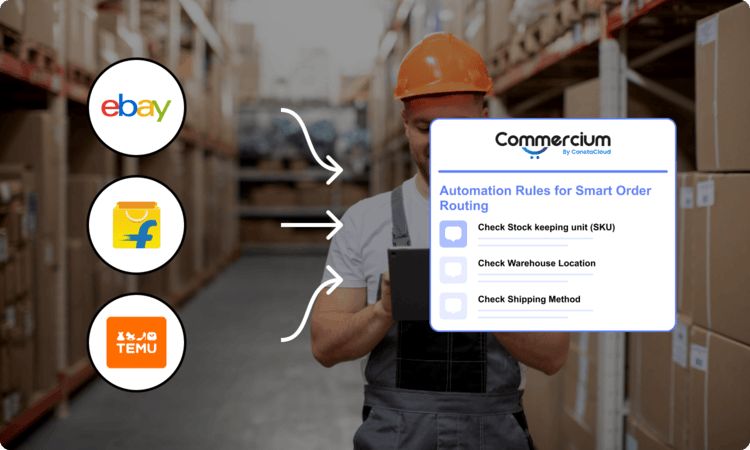
Automation Rules for Smart Order Routing

Automation Rules for Smart Order Routing

Automatically route orders to the right warehouse or fulfillment partner based on predefined conditions. For example, Amazon orders with specific SKUs can be routed to a dedicated warehouse for faster dispatch.

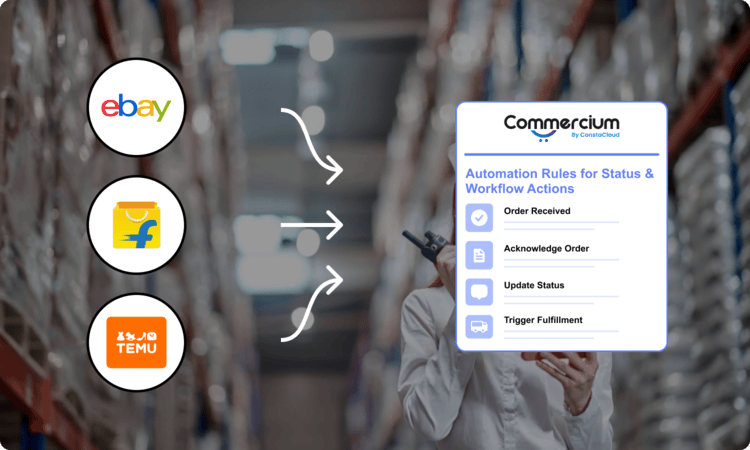
Automation Rules for Status & Workflow Actions

Automation Rules for Status & Workflow Actions

Automate key order actions, such as acknowledgment, invoicing, fulfillment, and tracking updates, across connected channels. For example, when an order is received, it can be auto-confirmed, shipped, and synced back with tracking details.

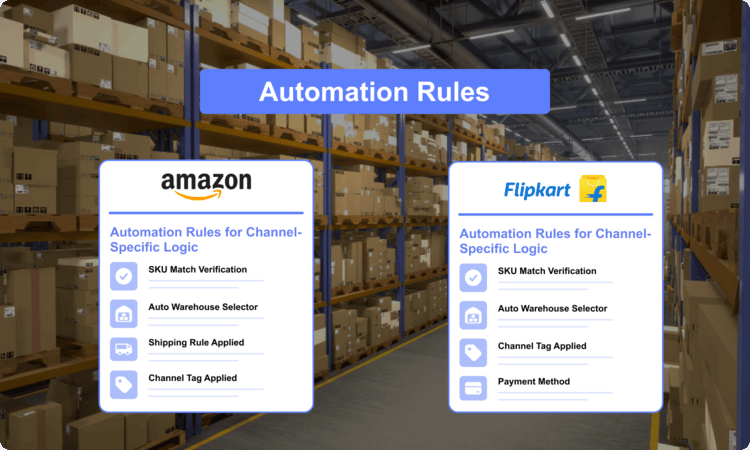
Automation Rules for Channel-Specific Logic

Automation Rules for Channel-Specific Logic

Customize workflows based on each sales channel to meet their specific requirements. For example, Walmart orders can be prioritized for express shipping, while Etsy orders follow a different workflow.

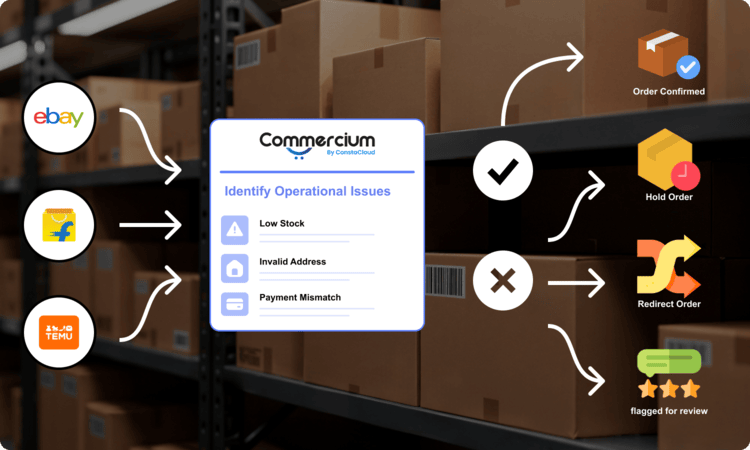
Automation Rules for Exception Handling & Alerts

Automation Rules for Exception Handling & Alerts

Identify and handle order issues automatically to avoid delays and errors. For example, orders with low stock or invalid addresses can be held or flagged for review instantly.

FAQ'S

Frequently Asked Questions

Technical questions about how the integration works, and general questions about running on Commercium.

What are Automation Rules in Commercium?
Automation Rules allow you to set predefined conditions to automatically manage orders, workflows, and actions across all your connected sales channels.
How do Automation Rules help reduce manual work?
Automation Rules automatically handle tasks like order routing, status updates, invoicing, and tracking sync, so you don’t have to manage them manually.
Can I create different rules for different marketplaces?
Yes, you can create channel-specific rules for platforms like Amazon, Temu, Walmart, or Etsy, ensuring each marketplace follows its own workflow and requirements.
Can Automation Rules handle order issues or exceptions?
Yes, you can set rules to detect issues like low stock, invalid addresses, or failed orders and automatically hold, flag, or alert your team for quick action.
Is there a free trial available?
Yes. Commercium offers a 28-day free trial, and no credit card is required to get started.
Can I sell on multiple marketplaces using Commercium?
Yes. Commercium supports more than 200 marketplaces, retailers, ecommerce platforms, and other commerce systems.

You can connect and manage multiple sales channels through a single Commercium subscription without purchasing a separate connector for each platform. Some enterprise and ERP integrations may require a higher-tier plan.
Does every order I receive on any channel get counted against my plan order limit?
No. Only orders received through sales channels connected using Commercium count toward your plan order limit.

For example, if you already sell through Shopify and use Commercium to connect three additional marketplaces, only orders received from those three marketplaces count toward your Commercium order limit. Your existing Shopify orders are not counted unless Shopify is also connected to Commercium as a sales channel for order processing.

Most supported platforms can be added without a separate per-connector fee, provided they are covered by your current plan category.
How frequently does data sync happen between connected platforms?
Inventory sync happens near real-time. Most other data, including products, prices, orders, fulfilment updates, and tracking information, is typically synchronized within 5–10 minutes.
What happens when I cross my plan limit?
Once you cross your plan limit, data sync remains active and everything keeps working as usual. We send you a monthly overage invoice that you can pay from within your Commercium portal within seven days of the invoice issue date.

You can also upgrade to a higher plan if you consistently exceed your plan limits, as higher-volume plans can cost less.
Can I connect my shipping platform with Commercium?
Yes. Commercium supports shipping, fulfilment, and 3PL platforms such as ShipStation, Veeqo, ShipHero, Amazon MCF, and others.

This allows you to send orders for fulfilment and synchronize shipment and tracking information with your connected sales channels.
Can I connect my ERP and accounting software with Commercium?
Yes. Commercium supports accounting platforms such as QuickBooks and Xero, as well as ERP systems including Microsoft Dynamics 365 Business Central, Odoo, Acumatica, NetSuite, and others.

These integrations can synchronize products, inventory, pricing, orders, fulfilment information, and accounting data, depending on the capabilities of each connected system.
What kind of support does Commercium offer?
Commercium provides support through chat, phone calls, screen-sharing sessions, and WhatsApp. Every plan also includes free onboarding to help you configure your account and connected platforms.

The support channels and service levels available may vary by plan.
Why are there three different types of pricing plans?
Commercium offers three pricing categories based on the types of systems included in your integration setup:

Ecommerce pricing applies when your setup includes only platforms classified as standard ecommerce integrations.

Enterprise pricing applies when your setup includes an enterprise marketplace, retailer, fulfilment network, or another platform classified as an enterprise integration.

ERP pricing applies when your setup includes an ERP system such as Business Central, Odoo, Acumatica, or NetSuite.

If your setup includes an Enterprise or ERP integration, the corresponding pricing category will apply. Our team can review your requirements and confirm the appropriate plan before you subscribe.


Read Full Reviews

Security & compliance

Commercium Is Enterprise Ready

We safeguard your data with advanced security measures, ensuring seamless operations and full compliance.

GDPR Compliant

Our platform is designed to support GDPR compliance through strong data protection and security practices.

SOC 2 Type II Audited

Independent SOC 2 Type II audit completed for Security, Availability, Processing Integrity, and Confidentiality. Report available under NDA upon request.

Strong Encryption

We encrypt data both in transfer and at rest with AES 256-bit encryption.

Multi-layered Firewall

We use multi-layered firewalls to safeguard our infrastructure, ensuring the security of your digital assets.

Why Commercium

One platform. 200+ commerce connections. No per-connector fees.

Once you start using Commercium, you can connect almost any supported marketplace, store, ERP, POS, warehouse or fulfilment platform without purchasing separate integration software.

Connect More in a Few Clicks

Add marketplaces, stores, ERPs, POS systems and fulfilment partners without buying another connector.

Connections Add channel
3 of 200+

Advanced Features Included

Get order routing, automation rules, AI product listings, repricing and virtual bundles with your integration.

Order routing Automation rules AI listings Repricing Virtual bundles

Connect Online & In-Store

Bring ecommerce, brick-and-mortar stores and POS channels together in one connected operation.

Online storeEcommerce & marketplaces
CommerciumOne connected operation
Retail storePOS & in-store stock
One inventory pool
Partners

We Are In Official Integration Partnership With