

Wix integration &
store automation
Commercium connects your Wix store to marketplaces, ERPs, OMS, WMS, shipping and accounting systems, products, inventory, orders, shipments, price updates, cancellations and refunds from one connection. Whichever Wix API version your site runs on, Commercium detects it and uses the right one.
28-day free trial. No credit card. Free onboarding with an integration engineer.
What Commercium solves for Wix merchants
Commercium connects Wix with marketplaces, ERPs, OMS, WMS, Shipping & Accounting platforms, enabling seamless product, inventory, order, shipment, price and refund synchronisation across your commerce platforms.
Your systems
Marketplaces · ERP · OMS · WMS · 3PL
Detects the Wix API version, then maps, transforms, schedules, validates & retries every flow
Wix
Wix Stores · API V1 / V2 / V3
A great storefront, an isolated back office
Wix makes it easy to build and run a store. Once you add marketplaces, a warehouse or an ERP, the work between those systems falls back on your team.
Marketplaces
Connecting marketplaces lets you publish your Wix catalog to new channels and bring every marketplace order into one stock pool.
ERP systems
Connecting your ERP turns Wix orders into sales orders and keeps items, cost and stock as the single source of truth.
OMS, WMS & 3PL
Connecting your warehouse or 3PL routes each Wix order to the right facility and closes it with a fulfilment.
Shipping & carriers
Connecting a shipping app or carrier account gets Wix orders labelled and tracked without leaving your shipping workflow.
Accounting platforms
Connecting accounting posts every Wix sale, refund and fee into your books without a spreadsheet in between.
Other stores & POS
Connecting another storefront or POS keeps Wix in step with every other place you sell, from one product set and stock figure.
What do you want to connect with Wix?
Choose a platform group to explore Wix combination pages for flows and pricing.
Marketplace Platforms
OMS Platforms
ERP Platforms
POS Platforms
Shipment Platforms
Social Platforms
Accounting Platforms
Retail Networks
CRM Platforms
Support Ticketing Platforms
3PL Platforms
Product sync
Inventory sync
Order sync
Shipment sync
Price update sync
Cancellations & refunds
Commercium supports 200+ marketplaces, ecommerce platforms, ERPs, shipping providers, accounting systems and fulfilment platforms — most of them connectable for free on your existing plan.
From demo to a live Wix connection
Seven steps from the first conversation to a controlled go-live, credentials, platform connections, mapping and a real order dry run before your catalogue goes live.
Book a Demo & Scope the Setup
Tell us what you sell wholesale, which systems hold your catalogue, stock, orders, and finance data, and whether you use Wix as your main store (source) or as a sales channel fed from another platform (destination). We’ll walk through the entire integration on a live call and explain exactly what your setup will look like.
Get Your Wix Access Ready
Commercium connects to Wix through Wix’s secure authorization, so there are no API keys to generate or copy. You approve the connection by logging in to Wix during setup. It takes about 2 minutes, and you need Administrator-level access (or equivalent permissions) to your Wix account.
- Make sure you can log in to the Wix account that owns your store.
- Check that your account has Administrator-level access, or permissions to products, orders, shipments, and other relevant data. The authorization may not grant full access without them.
- Keep your Wix login details handy. You’ll be asked to log in and authorize Commercium in Step 4 (Wix as source) or Step 5 (Wix as destination).
Log In to the Commercium Portal
- Go to the Commercium portal at app.mycommercium.com.
- Enter your email address and password.
- Click Log In.
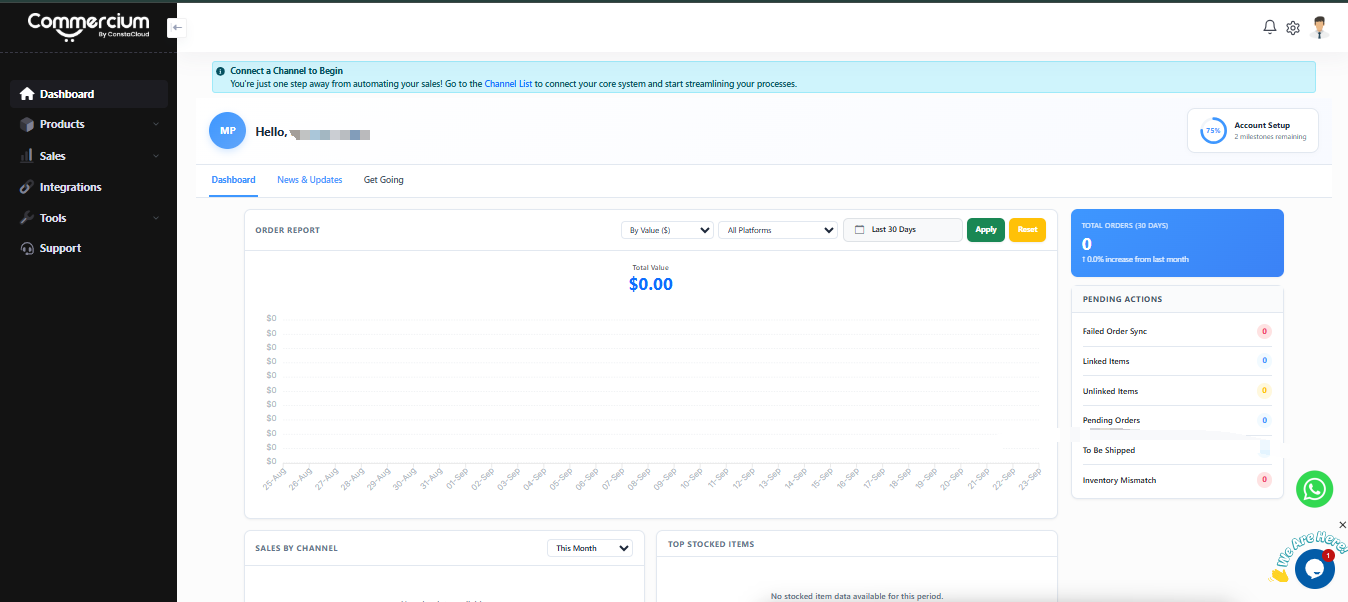
If you don’t have an account yet, contact [email protected]. After logging in, you’ll land on your Commercium dashboard. The left sidebar includes Dashboard, Products, Sales, Integrations, Tools, and Support.
Choose Your Source of Truth
Your source of truth is where your products, inventory and prices are managed, and your other channels sync from it. You have three options:
- On your Commercium dashboard, click Channel List.
- You’ll land on the Available Source Channels page.
- Type Wix in the search box and select it.
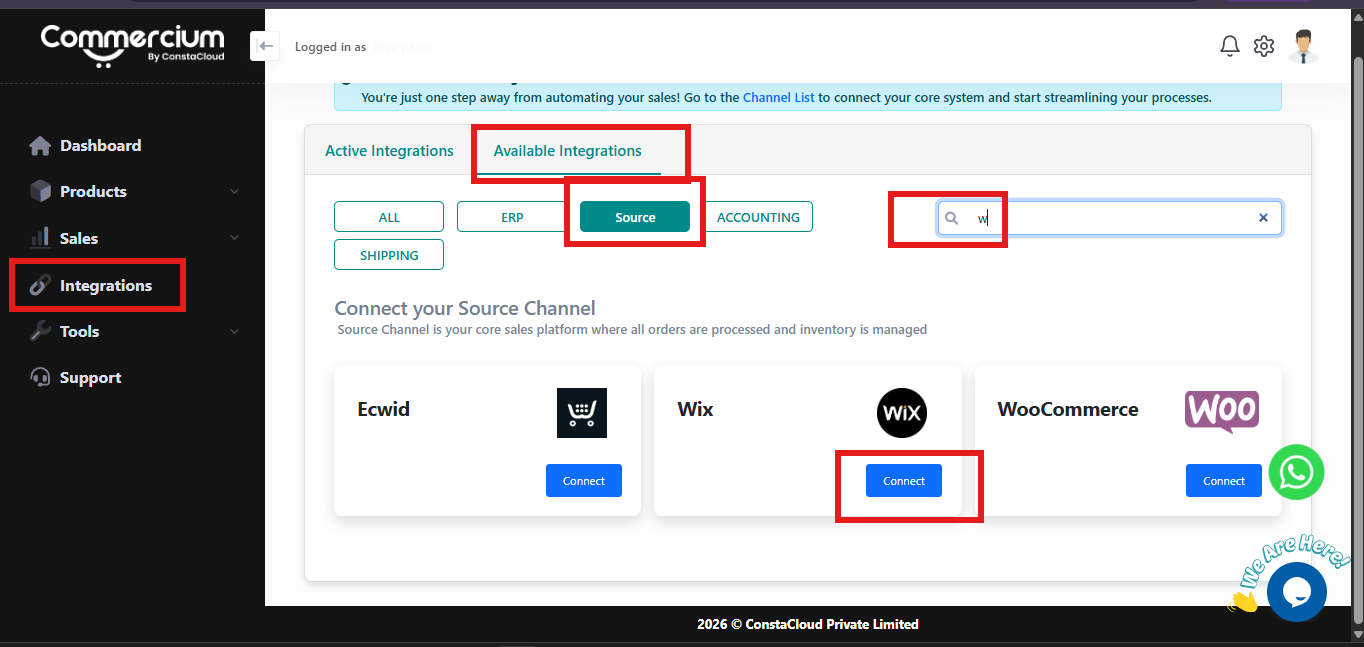
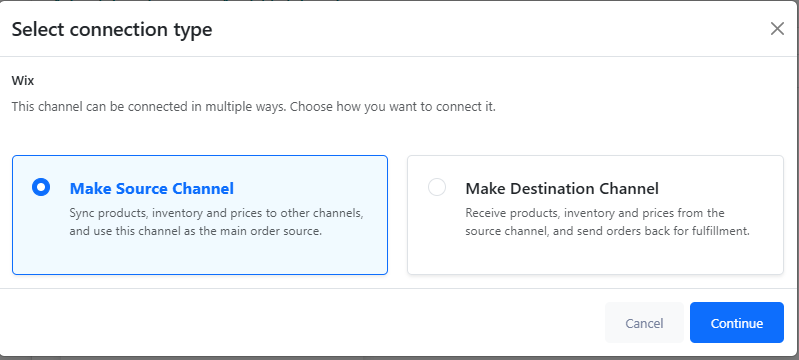
- Choose Make Source Channel and click Continue.
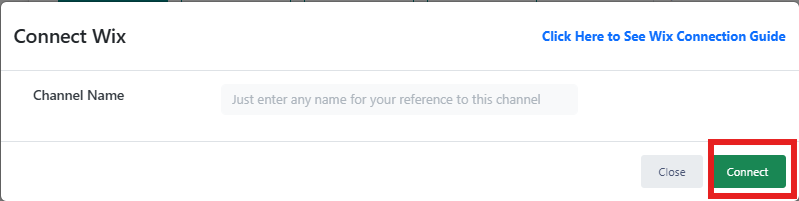
- Enter the credentials your platform asks for and click Connect.
- In the Connection Name field, enter a name for this connection, if prompted, and click Connect.
- You’ll be redirected to the Wix login page.
- Log in to your Wix account and authorize the connection.
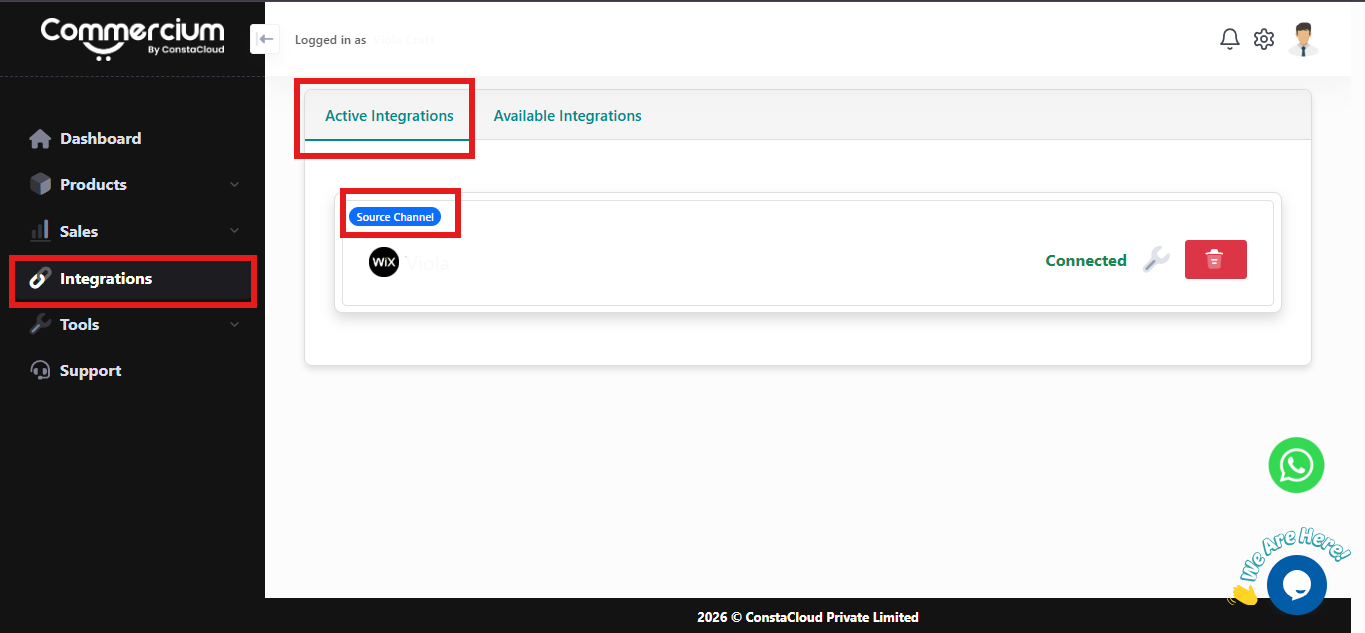
Nothing is published to wix until you switch product sync on, so you can review everything first. Once connected, your Walmart channel appears under the Active Integrations tab
Connect Wix in Commercium (as a Destination)
Use this step if another platform is your source and you want Wix to receive products, inventory and prices from it. If Wix is your source, connect your destination channels here instead, using their own guides.
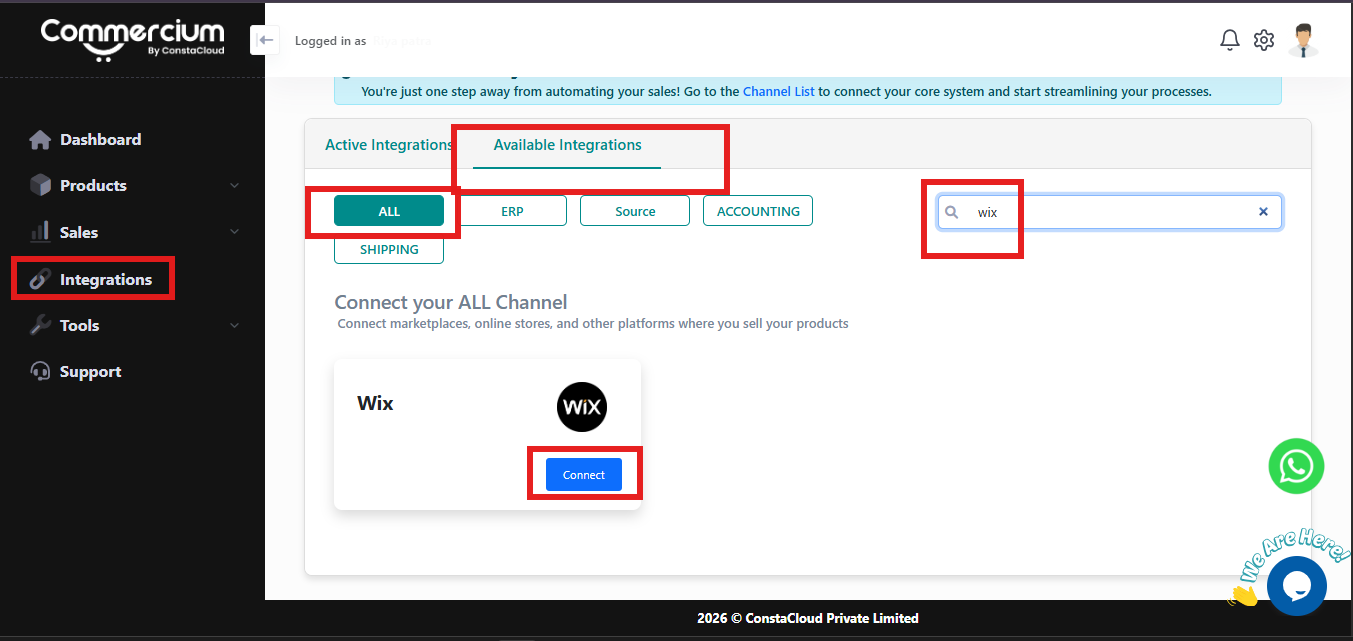
- In the left sidebar, click Integrations.
- Select the Integrations tab.
- Switch to Available Integrations.
- Click the “All” toggle in the top left corner.
- Type Wix in the search bar on the right.
- On the Wix card, click Connect.
- Choose Make Destination Channel and click Continue.
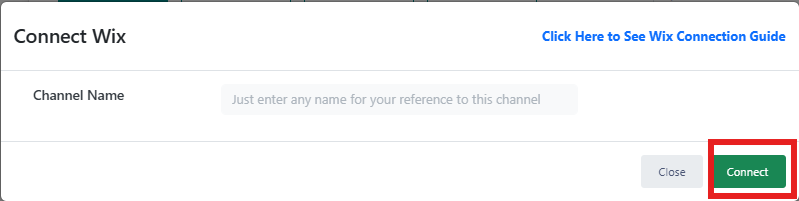
- In the Channel Name field, enter a name for this connection, such as “Wix Store.” This name is only for your reference inside Commercium.
- Click the green Connect button.
- You’ll be redirected to the Wix login page.
- Log in to your Wix account and authorize the connection.
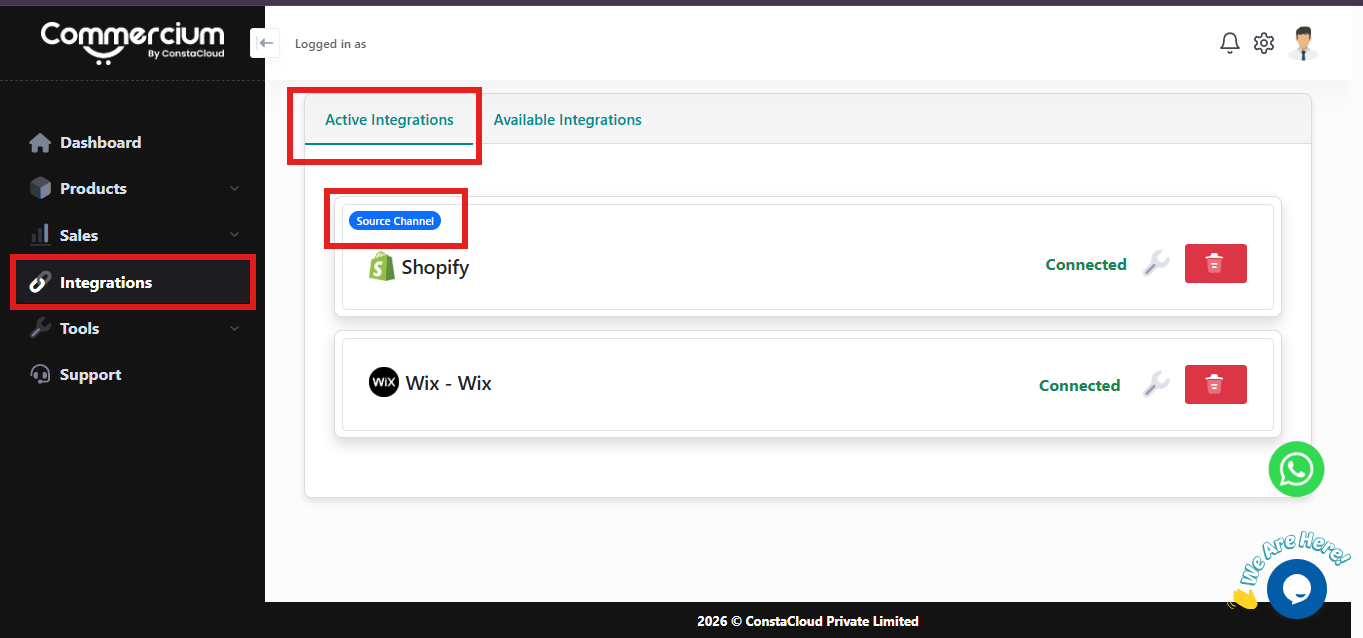
Nothing is published to Wix until you switch product sync on, so you can review everything first. Once connected, your Wix channel appears under the Active Integrations tab alongside the source platform.
Map Catalogue, Pricing & Operations
We map everything once so that every listing and order follows the same rules, including SKU identity, wix categories and attributes, variants and prepacks, wholesale and retail pricing, order minimums, warehouses, carriers, tax treatment, and how commissions and fees are posted to your books.
Test, Publish & Go Live
We import and link your existing wix listings first, then run a real order end to end, including import, dispatch, tracking, shipping charges, and settlement, before the full catalogue goes live. After go-live, your sync is monitored with alerts and a visible retry queue.
Find step-by-step instructions, tips and answers to common questions in our knowledge base.
What Wix is — and what integrating it actually involves
Wix is a cloud-based website platform used by millions of businesses and creators to build and run their websites. With Wix Stores and Wix eCommerce, merchants sell physical and digital products directly from their site, and extend it through the Wix App Market and Wix APIs.
A website builder with built-in commerce
Wix is one of the most widely used website platforms in the world. Its ecommerce capability — Wix Stores and the wider Wix eCommerce platform — lets a business add products, checkout and order management to the same site it designed visually.
Products built from options & choices
Wix products use options (such as size or colour) with choices, and variants carry their own price, SKU, weight and stock when the merchant chooses to manage them per variant.
Two ways to track stock
Merchants can track exact quantities, or simply mark products in stock or out of stock. An integration has to handle both, or published availability will not match reality.
Extended through apps & APIs
Wix sites are extended through the Wix App Market and Wix’s REST APIs. Integrations are authorised per site, so each Wix site is its own connection.
Built for many kinds of seller
From single-brand D2C stores to agencies running many client sites on Wix Studio, the same platform covers physical products, digital goods, bookings and subscriptions.
APIs that evolve over time
Wix has moved its store APIs through several generations. Older and newer sites can be on different versions at the same time, so an integration has to work with whichever one a site is on.
Real-world insights from Wix integrations
Working notes from live Wix integrations — the things that decide whether a Wix store runs quietly alongside your other channels, and how each one became automation inside Commercium.
Variants only exist when the merchant manages them
On Wix, a product can have options like size and colour without each combination having its own SKU, price or stock. That works on a single storefront but breaks the moment the same product is listed on a marketplace or pulled into an ERP, where every sellable unit needs an identity. We check how each product’s variants are managed during mapping and close the gaps before anything is published.
Tracking has to land on the Wix order quickly
Wix customers get their shipping confirmation from the Wix order. When tracking is copied over at the end of the day, “where is my order?” emails arrive first. Commercium creates the fulfilment on the Wix order with carrier and tracking as soon as your warehouse, 3PL or shipping app confirms dispatch.
Not every Wix product tracks quantity
Some merchants only mark products in stock or out of stock. Publishing quantities from those products to a marketplace either oversells or hides stock, so we decide the stock source per product during mapping.
SKUs are often optional on Wix
Wix does not force a SKU on every product or variant. Before connecting other channels we audit for blank or duplicate SKUs, because every order and stock update keys off that identity.
One account, many sites
Agencies and multi-brand sellers often run several Wix sites under one account. Each site is authorised and synced as its own connection, and all of them sit on the same Commercium plan.
Refunds are not always full
Partial refunds — one line, shipping only, a goodwill amount — are common on Wix. We carry the refunded amount and lines into the ERP and accounting rather than treating every refund as a cancellation.
Carrier names need mapping
The carrier your shipping app reports does not always match the carrier names Wix recognises. Mapping them once means tracking links work in the customer’s shipping email.
Migrations happen without warning
Wix can move a site to a newer API version in the background. Because we re-check the version on an ongoing basis, a migration does not interrupt orders or stock updates.
Working notes from our integration team — we update this section as Wix’s platform changes.
Sell on Unlimited Channels Without Adding Connector Subscriptions
-
![check Icon]() 28-day Free Trial
-
![check Icon]() No Credit Card Required
-
![check Icon]() No Commitment
-
![check Icon]() Enterprise level security
 28-day Free Trial
E-commerce Pricing
Pro Seller Plan
49.95/Month
OR
499.50/Year
- 300 Orders Per month Push orders details with customer details, line items & tax data from connected channels to your primary sales channel. Note : Your primary channel orders will not be counted against your order limit.
- Product Listings 3,000 SKU Push products details like Title, Description & images from your primary channel automatically to other connected channels.
- Unlimited Channel Integrations Our software allows you to connect unlimited marketplaces & sell your products across all marketplaces to grow your revenue.
- Order Sync Automatically sync orders to connected platforms along with customer info, taxes & all other costs.
- Inventory Sync Automatically synchronize your inventory levels across all the sales channels.
- Product Listings Automatically publish and manage product listings across connected marketplaces from a single platform.
- Shipment Sync Carrier & tracking information back to order source automatically once the order is fulfilled.
- Product Updates Sync Product updates allows you to sync any product updates you perform inside your product source platform or Commercium to other connected destination platforms including price & any other product data updates. You can perform 5X the times of product updates per month of total SKU limit of your current plan.
- AI Data Enrichment Optimize listings with auto-rephrased content that follows sales channel rules while keeping your message clear and compliant.
- Unlimited Users You can add all of your team members to manage our software.
- Refunds & Cancellations Sync This feature saves a lot of time & hassles by automatically cancelling the order if it gets cancelled by the customer.
- Near Realtime Sync All our plans provide near-real-time sync speeds to avoid any inventory discrepancy.
- Assisted Onboarding Our eCommerce expert will guide you step-by-step to get started, from setup to first sync, we’ll handle it with you.
- Priority Email Support We provide 24X7 Email support.
- Live Chat Support We provide 12x5 Live chat support.
Pro Seller Plus Plan
79.95/Month
OR
799.50/Year
- Pro Seller Plan &
- 600 Orders Per month Push orders details with customer details, line items & tax data from connected channels to your primary sales channel. Note : Your primary channel orders will not be counted against your order limit.
- Product Listings 6,000 SKU Push products details like Title, Description & images from your primary channel automatically to other connected channels.
- Virtual Bundles & Kits Create bundles or kits in Commercium without physically bundling stock. When a bundle sells, inventory is automatically adjusted for the underlying items across all connected channels.
- Marketplace Settlement Sync Automatically import marketplace settlement reports and reconcile them with your orders, fees, refunds, and payouts. Get a clear view of what was sold, what was paid, and what was deducted without manual spreadsheets. Available for selected marketplaces.
- Live Chat Support Via WhatsApp We provide 12x5 WhatsApp chat support.
Elite Seller Plan
139.95/Month
OR
1,399.50/Year
- Pro Seller Plus Plan &
- 1,200 Orders Per month Push orders details with customer details, line items & tax data from connected channels to your primary sales channel. Note : Your primary channel orders will not be counted against your order limit.
- Product Listings 15,000 SKU Push products details like Title, Description & images from your primary channel automatically to other connected channels.
- Automation Rules Define smart rules to automatically take action on orders, inventory, and statuses. For example: auto-route orders, auto-hold risky orders, auto-update inventory, or auto-change order status based on predefined conditions.
- Dedicated Account Manager Get personal support whenever you need. Your account manager is just a message away to help throughout your journey with us.
Elite Seller Plus Plan
229.95/Month
OR
2,299.50/Year
- Elite Seller Plan &
- 2,400 Orders Per month Push orders details with customer details, line items & tax data from connected channels to your primary sales channel. Note : Your primary channel orders will not be counted against your order limit.
- Product Listings 30,000 SKU Push products details like Title, Description & images from your primary channel automatically to other connected channels.
Super Seller Plan
389.95/Month
OR
3,899.50/Year
- Elite Seller Plus Plan &
- 6,000 Orders Per month Push orders details with customer details, line items & tax data from connected channels to your primary sales channel. Note : Your primary channel orders will not be counted against your order limit.
- Product Listings 60,000 SKU Push products details like Title, Description & images from your primary channel automatically to other connected channels.
Super Seller Plus Plan
599.95/Month
OR
5,999.50/Year
- Super Seller Plan &
- 12,000 Orders Per month Push orders details with customer details, line items & tax data from connected channels to your primary sales channel. Note : Your primary channel orders will not be counted against your order limit.
- Product Listings 1,20,000 SKU Push products details like Title, Description & images from your primary channel automatically to other connected channels.
Custom Plan
Custom Pricing
OR
Contact For Pricing
- Super Seller Plus Plan &
- Orders Per month (As per your plan) Push orders details with customer details, line items & tax data from connected channels to your primary sales channel. Note : Your primary channel orders will not be counted against your order limit.
- Product Listings (As per your plan) Push products details like Title, Description & images from your primary channel automatically to other connected channels.


Note:
No forced upgrades. Continue on your plan and pay for extra usage that will be charged as per your current plan’s per order cost.
Your existing channel orders will not be deducted against your plan order limit.
Only need order and shipment syncing?
Contact us for discounted pricing if you don’t need inventory sync, product listings, or repricing.
Get Custom PricingYour Integration Costs Shouldn't Multiply as You Grow
Traditional integration software can turn every new channel into another subscription. Commercium is designed around one orchestration layer.
| As you grow | Traditional approach | Commercium |
|---|---|---|
| Add another marketplace | Buy another connector | Included |
| Add another store | Buy another connector | Included |
| Add warehouse / 3PL | Add another integration | Included |
| Add shipping systems | Add another integration | Included |
| Need routing & automation | Add more software | Included |
| Need centralized operations | Add an OMS | Built in |
Read Full Reviews

Wix integration FAQs
Technical questions about how the integration works, and general questions about running on Commercium.
What is Wix Integration?
Can Commercium integrate multiple Wix stores?
Can marketplace orders be imported into Wix?
Can Wix connect to more than one ERP, warehouse, or 3PL?
Can Commercium sync my E-Commerce data to my ERP's?
How to Integrate Wix with different platforms?
Is there a refund policy if Commercium doesn’t work for me?
How does Commercium deliver better value than competitors?
How does Commercium pricing work?
What are the next steps to get started?
How much time it will take for setup?
Is there a free trial available?
Can I sell on multiple marketplaces using Commercium?
You can connect and manage multiple sales channels through a single Commercium subscription without purchasing a separate connector for each platform. Some enterprise and ERP integrations may require a higher-tier plan.
Does every order I receive on any channel get counted against my plan order limit?
For example, if you already sell through Shopify and use Commercium to connect three additional marketplaces, only orders received from those three marketplaces count toward your Commercium order limit. Your existing Shopify orders are not counted unless Shopify is also connected to Commercium as a sales channel for order processing.
Most supported platforms can be added without a separate per-connector fee, provided they are covered by your current plan category.
How frequently does data sync happen between connected platforms?
What happens when I cross my plan limit?
You can also upgrade to a higher plan if you consistently exceed your plan limits, as higher-volume plans can cost less.
Can I connect my shipping platform with Commercium?
This allows you to send orders for fulfilment and synchronize shipment and tracking information with your connected sales channels.
Can I connect my ERP and accounting software with Commercium?
These integrations can synchronize products, inventory, pricing, orders, fulfilment information, and accounting data, depending on the capabilities of each connected system.
What kind of support does Commercium offer?
The support channels and service levels available may vary by plan.
Why are there three different types of pricing plans?
Ecommerce pricing applies when your setup includes only platforms classified as standard ecommerce integrations.
Enterprise pricing applies when your setup includes an enterprise marketplace, retailer, fulfilment network, or another platform classified as an enterprise integration.
ERP pricing applies when your setup includes an ERP system such as Business Central, Odoo, Acumatica, or NetSuite.
If your setup includes an Enterprise or ERP integration, the corresponding pricing category will apply. Our team can review your requirements and confirm the appropriate plan before you subscribe.
Customer Case Study



Commercium Is Enterprise Ready
We safeguard your data with advanced security measures, ensuring seamless operations and full compliance.
GDPR Compliant
Our platform is designed to support GDPR compliance through strong data protection and security practices.
SOC 2 Type II Audited
Independent SOC 2 Type II audit completed for Security, Availability, Processing Integrity, and Confidentiality. Report available under NDA upon request.
Strong Encryption
We encrypt data both in transfer and at rest with AES 256-bit encryption.
Multi-layered Firewall
We use multi-layered firewalls to safeguard our infrastructure, ensuring the security of your digital assets.
One platform. 200+ commerce connections. No per-connector fees.
Once you start using Commercium, you can connect almost any supported marketplace, store, ERP, POS, warehouse or fulfilment platform without purchasing separate integration software.
Connect More in a Few Clicks
Add marketplaces, stores, ERPs, POS systems and fulfilment partners without buying another connector.
Advanced Features Included
Get order routing, automation rules, AI product listings, repricing and virtual bundles with your integration.
Connect Online & In-Store
Bring ecommerce, brick-and-mortar stores and POS channels together in one connected operation.
Turn Wix into the connected centre of your commerce operation
Whether you use Wix for one store or multiple storefronts, Commercium can connect the systems and automate the workflows around it.
Our Proud Customers


