

Supply Wayfair as a Dropship Partner
Straight Out of Acumatica
Commercium connects Acumatica Cloud ERP to your Wayfair supplier account through the Wayfair Supplier API and runs the dropship cycle: live stock pushed as an inventory feed, Wayfair purchase orders accepted and created as Acumatica sales orders for your Wayfair customer, shipping labels and packing slips generated from Wayfair, shipment notices with tracking sent back, and cancellations kept in step on both sides.
No credit card required. Onboarding takes 1–2 hours once your details are provided.
How Acumatica and Wayfair connect
Commercium sits in the middle, turning Wayfair purchase orders into Acumatica sales orders and Acumatica stock and shipments into Wayfair feeds, labels and shipment notices.
What Commercium automates
Inventory sync
Available quantity from the Acumatica warehouses you pick is pooled, buffered and sent to Wayfair as an inventory feed per supplier part number, so a sale on any channel updates Wayfair within minutes.
Order sync
Wayfair dropship purchase orders are accepted line by line against live stock and land in Acumatica as sales orders for your Wayfair customer, with the PO number stored as the customer order number.
Shipment sync
When a shipment is confirmed in Acumatica, an advance shipment notice with carrier, tracking and package details goes to Wayfair, including multi-box shipments.
Shipping label generation
Commercium registers each PO with Wayfair to generate the shipping label, packing slip and, for freight, the bill of lading, and attaches them to the Acumatica sales order.
Cancel sync
Wayfair cancellations close the matching Acumatica sales order lines. Lines you cannot supply are rejected or backordered on Wayfair from Acumatica.
Need a flow that is not listed?
Extra warehouses, more Wayfair supplier IDs or routing POs to your 3PL or WMS are set up during onboarding.
Talk to usFrom demo to a live Wayfair channel on Acumatica
Seven steps from the first conversation to a controlled go-live: Wayfair API credentials, Acumatica and Wayfair connections, catalogue, pricing and operations mapping, then a verified test before you go live.
Book a demo & scope the setup
Tell us what you sell, which Wayfair marketplaces you're on or planning to join, and how your Acumatica store is set up. We walk through the whole integration on a live call and show you exactly how Acumatica and Wayfair will work together.
Get your Wayfair API credentials
Wayfair gives each seller API access from their seller account. You'll need three details to connect: your API key, your Shop ID and your marketplace's base URL. We tell you exactly where to find each one so nothing is missing.
Log in to the Commercium portal
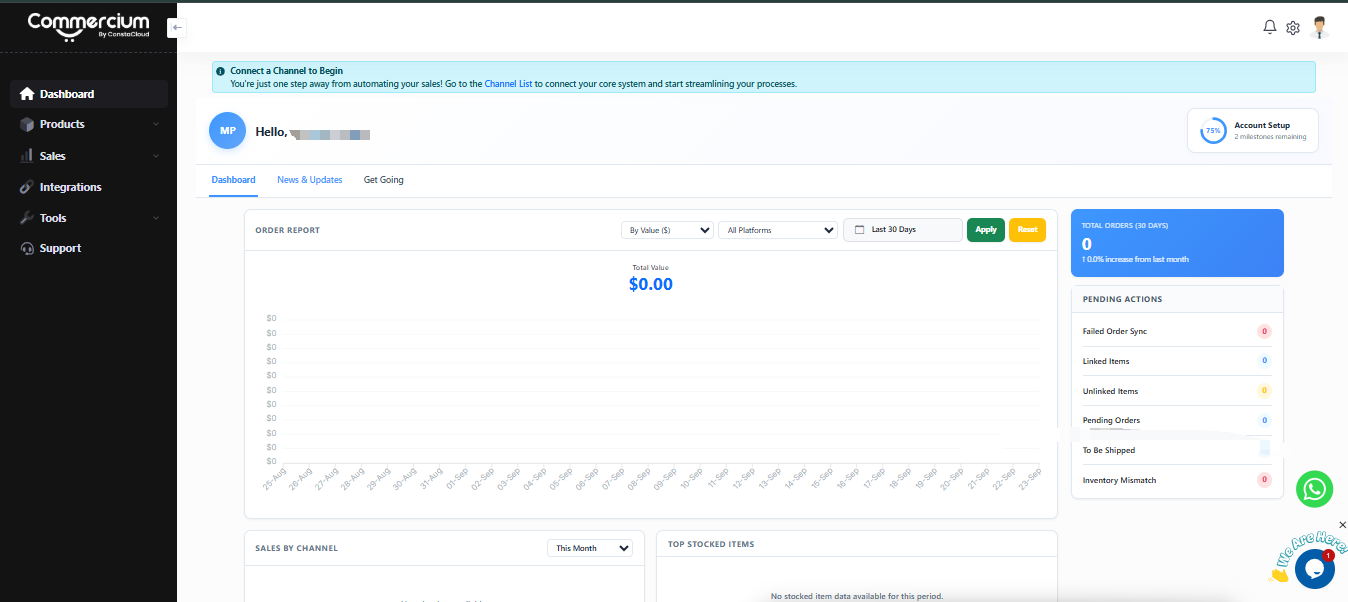
After logging in, you'll land on your Commercium dashboard. The left sidebar includes Dashboard, Products, Sales, Integrations, Tools and Support.
Connect Acumatica in Commercium
Acumatica is your source channel. Your products, stock and prices come from here, and Wayfair orders are created here.
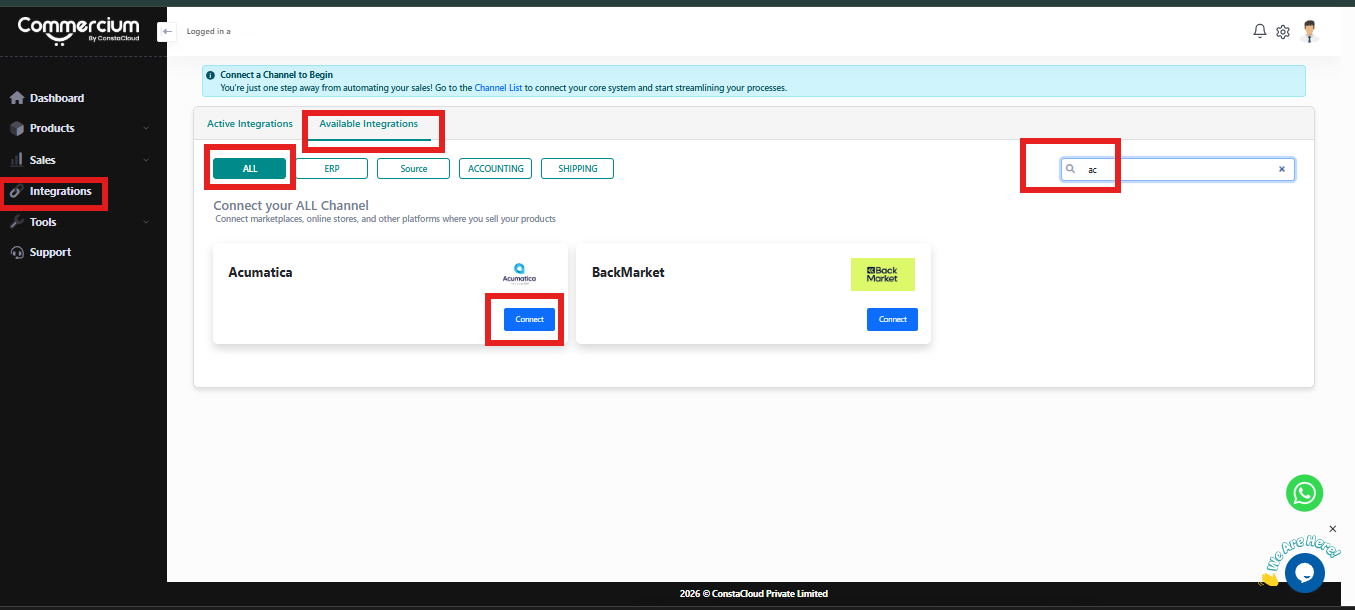
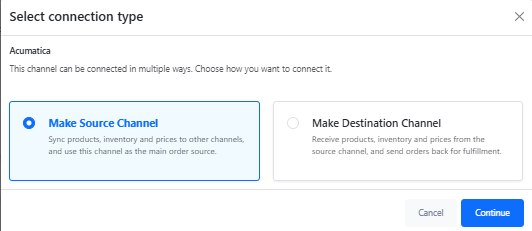
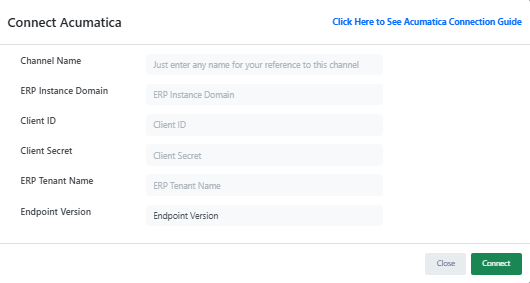
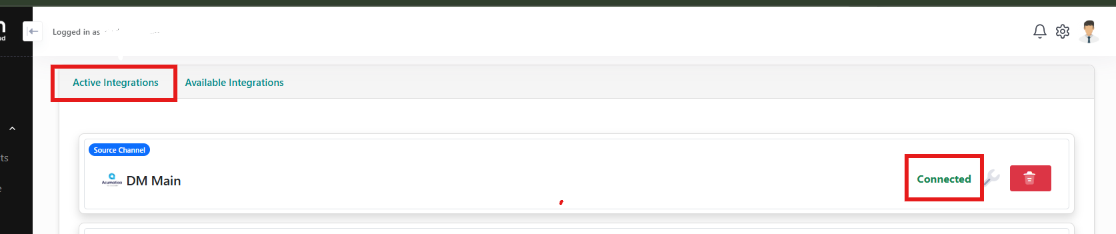
Once connected, Acumatica appears under the Active Integrations tab.
Connect Wayfair in Commercium
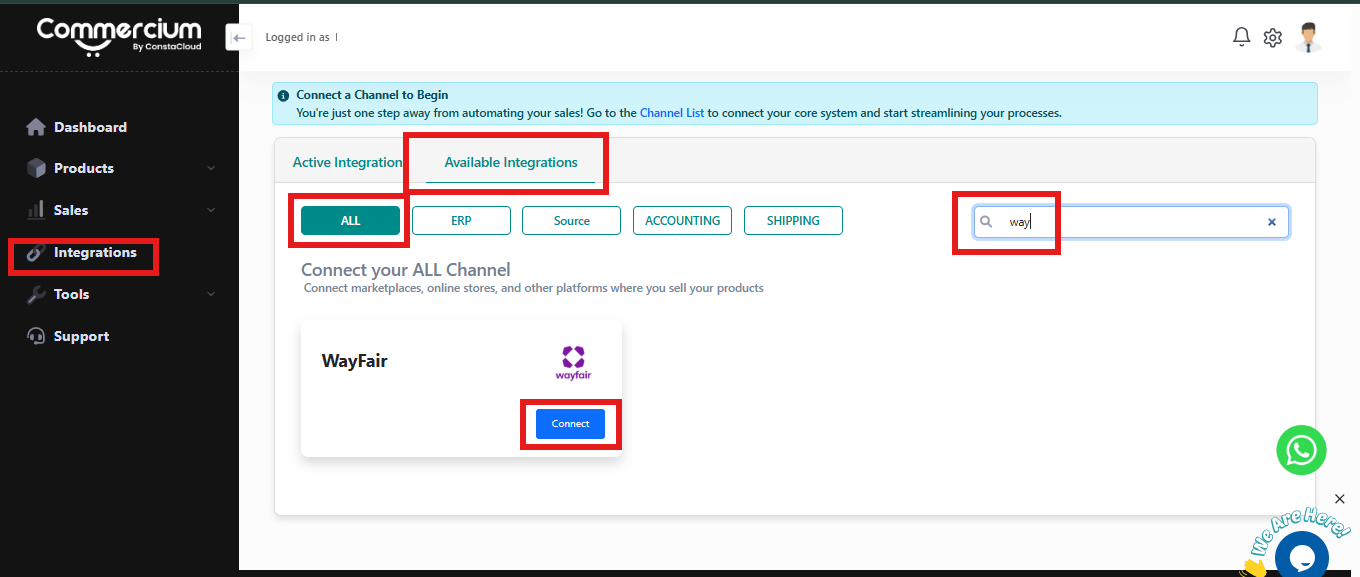
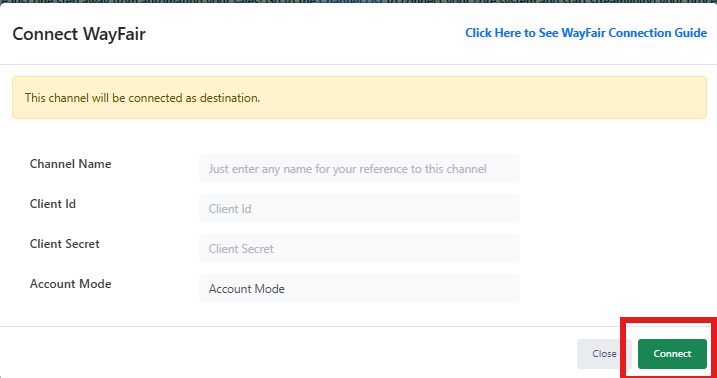
Nothing is published to Wayfair until you switch product sync on, so you can review everything first. Once connected, your Wayfair channel appears under the Active Integrations tab alongside Acumatica.
Map catalogue, pricing & operations
We map it once so every listing and every order follows the same rules: product identity, stock buffers, pricing, order formats and shipping methods between Acumatica and Wayfair.
Test, publish & go live
We publish a controlled batch of products first, then run a real order end to end before the full catalogue goes live. That means the order is imported into Acumatica, fulfilled, and has its tracking pushed back to Wayfair. After go-live your sync is monitored, with alerts and a retry queue you can see.
Acumatica and Wayfair, and what connecting them actually involves
One is your ERP: items, warehouse stock, sales orders, shipments and the books. The other is one of the largest online destinations for furniture and home goods, where you sell as a supplier. Wayfair buys at your wholesale cost and sends purchase orders for you to ship. The work of the combo sits in between.
Acumatica contract-based API plus push notifications
Synced across both platforms
Typical onboarding time
Wayfair Supplier API with OAuth2
Acumatica
Your ERP & stock source
Acumatica Cloud ERP is a cloud business management suite used by mid-market distributors, manufacturers and retailers, licensed by the resources you use rather than per user. Items live as stock items, matrix items and kits, stock is tracked per warehouse and location, sales orders move through shipments and AR invoices, and everything is reachable through the contract-based REST API. For Wayfair suppliers it already holds the stock, the warehouse and the books, which makes it the natural engine for a dropship channel.
Wayfair
Online home goods retailer · US, Canada & UK
Wayfair is one of the world’s largest online destinations for furniture and home goods, headquartered in Boston and selling through sites in the US, Canada and the UK. It is a retailer rather than an open marketplace: suppliers list products at a wholesale cost, Wayfair sets the retail price, and orders arrive as dropship purchase orders that the supplier ships straight to the customer. Suppliers connect through the Wayfair Supplier API, a GraphQL API covering inventory, purchase orders, shipping documents and shipment notices, or through EDI.
What we learnt while integrating Wayfair for our users
Working notes from live Wayfair supplier integrations, the things that decide whether a Wayfair account runs quietly, and how each one became automation inside Commercium.
Sandbox testing is where Wayfair go-lives stall, so we own it with you
Wayfair requires suppliers to complete sandbox testing before production credentials are enabled. Test orders have to be pulled, accepted, registered for labels, shipped and confirmed in the sandbox, and inventory feeds have to pass before Wayfair signs off. Commercium runs that testing with you:
Wayfair is a buyer, not a marketplace
On Wayfair you are a supplier, not a seller. Wayfair buys at your wholesale cost, sets the retail price, and sends purchase orders that must be accepted with a ship date you can meet. Slow acceptance, missed ship dates and cancellations all land on your supplier scorecard. Commercium helps suppliers:
Labels come from Wayfair, not your own carrier account
For most dropship POs, Wayfair arranges the carrier. You register the PO, Wayfair generates the shipping label, packing slip and, for freight, the bill of lading, and the carrier collects. A label bought on your own account breaks Wayfair’s tracking and can turn into a chargeback. Commercium registers each PO when it is ready to ship and attaches the documents to the Acumatica shipment, so the warehouse prints from one place.
Most inventory errors are identity problems, not stock problems
Wayfair tracks stock by supplier part number, and one Acumatica item may map to a part number with different packaging, a kit or a multi-box item. Send the wrong number, or a quantity from the wrong warehouse, and Wayfair keeps showing stock you don’t have, or hides stock you do. The first sign is usually an oversold PO you have to reject. Commercium has built depth in:
Send changes fast, reconcile on a schedule
Small updates keep Wayfair current between sales, but one missed update can leave a part number wrong for days. We send changes as stock moves and run a full reconciliation feed on a schedule.
Parcel and freight ship differently
Large furniture travels as LTL freight with a bill of lading and a pickup window, while smaller items ship parcel with a label per box. Commercium handles both from the same Acumatica shipment.
Multi-box items need every box accounted for
A sofa or wardrobe can ship in several cartons, each with its own label and tracking number. The shipment notice has to list every package, or Wayfair treats it as a partial shipment.
US, Canada and UK are separate setups
Each Wayfair country runs with its own supplier setup, currency and carriers. We connect each one as its own channel, with its own Wayfair customer in Acumatica, drawing on the same stock.
The scorecard is the KPI that matters
On-time shipping, cancellations and acceptance speed feed Wayfair’s supplier scorecard. We alert on POs at risk before they become a late shipment, not in a monthly report.
A backorder date beats a silent rejection
Rejecting a line without a reason reads as a cancellation. Where stock is on its way, we send a backorder date instead, and reject only what genuinely cannot ship.
Wayfair owns the customer and the retail price
Orders are created in Acumatica against your Wayfair customer, with line prices taken from the wholesale cost on the PO, so invoices and margin reports reflect what Wayfair pays, not its retail price.
Working notes from our integration team, we update this section as Wayfair’s requirements change.
Sell on Unlimited Channels Without Adding Connector Subscriptions
-
![check Icon]() 28-day Free Trial
-
![check Icon]() No Credit Card Required
-
![check Icon]() No Commitment
-
![check Icon]() Enterprise level security
 28-day Free Trial
Enterprise Pricing
(Note: This plan will only apply if you have one or more connected platforms that fall under the Enterprise category.)
Pro Seller Plan
99.95/Month
OR
999.50/Year
- 300 Orders Per month Push orders details with customer details, line items & tax data from connected channels to your primary sales channel. Note : Your primary channel orders will not be counted against your order limit.
- Unlimited SKUs Push products details like Title, Description & images from your primary channel automatically to other connected channels.
- Unlimited Channel Integrations Our software allows you to connect unlimited marketplaces & sell your products across all marketplaces to grow your revenue.
- Order Sync Automatically sync orders to connected platforms along with customer info, taxes & all other costs.
- Inventory Sync Automatically synchronize your inventory levels across all the sales channels.
- Product Listings Automatically publish and manage product listings across connected marketplaces from a single platform.
- Shipment Sync Carrier & tracking information back to order source automatically once the order is fulfilled.
- Product Updates Sync Product updates allows you to sync any product updates you perform inside your product source platform or Commercium to other connected destination platforms including price & any other product data updates. You can perform 5X the times of product updates per month of total SKU limit of your current plan.
- AI Data Enrichment Optimize listings with auto-rephrased content that follows sales channel rules while keeping your message clear and compliant.
- Unlimited Users You can add all of your team members to manage our software.
- Refunds & Cancellations Sync This feature saves a lot of time & hassles by automatically cancelling the order if it gets cancelled by the customer.
- Near Realtime Sync All our plans provide near-real-time sync speeds to avoid any inventory discrepancy.
- Virtual Bundles & Kits Create bundles or kits in Commercium without physically bundling stock. When a bundle sells, inventory is automatically adjusted for the underlying items across all connected channels.
- Automation Rules Define smart rules to automatically take action on orders, inventory, and statuses. For example: auto-route orders, auto-hold risky orders, auto-update inventory, or auto-change order status based on predefined conditions.
- Assisted Onboarding Our eCommerce expert will guide you step-by-step to get started, from setup to first sync, we’ll handle it with you.
- Priority Email Support We provide 24X7 Email support.
- Live Chat Support We provide 12x5 Live chat support.
- Live Chat Support Via WhatsApp We provide 12x5 WhatsApp chat support.
- Dedicated Account Manager Get personal support whenever you need. Your account manager is just a message away to help throughout your journey with us.
Pro Seller Plus Plan
149.95/Month
OR
1499.50/Year
- Pro Seller Plan &
- 600 Orders Per month Push orders details with customer details, line items & tax data from connected channels to your primary sales channel. Note : Your primary channel orders will not be counted against your order limit.
- Marketplace Settlement Sync Automatically import marketplace settlement reports and reconcile them with your orders, fees, refunds, and payouts. Get a clear view of what was sold, what was paid, and what was deducted without manual spreadsheets. Available for selected marketplaces.
Elite Seller
239.95/Month
OR
2399.50/Year
- Pro Seller Plus Plan &
- 1,200 Orders Per month Push orders details with customer details, line items & tax data from connected channels to your primary sales channel. Note : Your primary channel orders will not be counted against your order limit.
Elite Seller Plus Plan
399.95/Month
OR
3999.50/Year
- Elite Seller &
- 2,400 Orders Per month Push orders details with customer details, line items & tax data from connected channels to your primary sales channel. Note : Your primary channel orders will not be counted against your order limit.
Super Seller Plan
599.95/Month
OR
5,999.50/Year
- Elite Seller Plus Plan &
- 4,800 Orders Per month Push orders details with customer details, line items & tax data from connected channels to your primary sales channel. Note : Your primary channel orders will not be counted against your order limit.
Super Seller Plus Plan
1,099.95/Month
OR
10,999.50/Yearr
- Super Seller Plan &
- 9,600 Orders Per month Push orders details with customer details, line items & tax data from connected channels to your primary sales channel. Note : Your primary channel orders will not be counted against your order limit.
Custom Plan
Custom Pricing
OR
Contact For Pricing
- Super Seller Plus Plan &
- Orders Per month (As per your plan) Push orders details with customer details, line items & tax data from connected channels to your primary sales channel. Note : Your primary channel orders will not be counted against your order limit.


Note:
No forced upgrades. Continue on your plan and pay for extra usage that will be charged as per your current plan’s per order cost.
Your existing channel orders will not be deducted against your plan order limit.
Only need order and shipment syncing?
Contact us for discounted pricing if you don’t need inventory sync, product listings, or repricing.
Get Custom PricingYour Integration Costs Shouldn't Multiply as You Grow
Traditional integration software can turn every new channel into another subscription. Commercium is designed around one orchestration layer.
| As you grow | Traditional approach | Commercium |
|---|---|---|
| Add another marketplace | Buy another connector | Included |
| Add another store | Buy another connector | Included |
| Add warehouse / 3PL | Add another integration | Included |
| Add shipping systems | Add another integration | Included |
| Need routing & automation | Add more software | Included |
| Need centralized operations | Add an OMS | Built in |
Read Full Reviews

Acumatica + Wayfair questions, answered
Technical questions about how the two platforms sync, and general questions about running on Commercium.
Can Commercium create products on Wayfair?
Are Wayfair orders invoiced in Acumatica?
Can Commercium help new Wayfair sellers?
Can I connect more than one seller account of Wayfair using Commercium?
What are the next steps to connect Acumatica to Wayfair using Commercium?
Which flows does Commercium sync between Acumatica and Wayfair?
Does the Wayfair integration run on Mirakl?
How are Wayfair purchase orders accepted and created in Acumatica?
How are Wayfair shipping labels generated?
Does Commercium support LTL freight and multi-box items?
How is tracking sent to Wayfair?
How do cancellations sync between Acumatica and Wayfair?
Which Acumatica warehouses does Wayfair inventory come from?
Does Commercium sync prices with Wayfair?
Can I connect Wayfair Canada or Wayfair UK?
Does Commercium work with matrix items and kits in Acumatica?
Is there a free trial available?
Can I sell on multiple marketplaces using Commercium?
You can connect and manage multiple sales channels through a single Commercium subscription without purchasing a separate connector for each platform. Some enterprise and ERP integrations may require a higher-tier plan.
Does every order I receive on any channel get counted against my plan order limit?
For example, if you already sell through Shopify and use Commercium to connect three additional marketplaces, only orders received from those three marketplaces count toward your Commercium order limit. Your existing Shopify orders are not counted unless Shopify is also connected to Commercium as a sales channel for order processing.
Most supported platforms can be added without a separate per-connector fee, provided they are covered by your current plan category.
How frequently does data sync happen between connected platforms?
What happens when I cross my plan limit?
You can also upgrade to a higher plan if you consistently exceed your plan limits, as higher-volume plans can cost less.
Can I connect my shipping platform with Commercium?
This allows you to send orders for fulfilment and synchronize shipment and tracking information with your connected sales channels.
Can I connect my ERP and accounting software with Commercium?
These integrations can synchronize products, inventory, pricing, orders, fulfilment information, and accounting data, depending on the capabilities of each connected system.
What kind of support does Commercium offer?
The support channels and service levels available may vary by plan.
Why are there three different types of pricing plans?
Ecommerce pricing applies when your setup includes only platforms classified as standard ecommerce integrations.
Enterprise pricing applies when your setup includes an enterprise marketplace, retailer, fulfilment network, or another platform classified as an enterprise integration.
ERP pricing applies when your setup includes an ERP system such as Business Central, Odoo, Acumatica, or NetSuite.
If your setup includes an Enterprise or ERP integration, the corresponding pricing category will apply. Our team can review your requirements and confirm the appropriate plan before you subscribe.
Connect Acumatica through its REST API with a connected application and API user you approve, plus Wayfair Supplier API credentials from a registered application. Acumatica stays the source of truth for stock, and every flow is tested in Wayfair’s sandbox and on real data before anything goes live.
Customer Case Study




Commercium Is Enterprise Ready
We safeguard your data with advanced security measures, ensuring seamless operations and full compliance.
GDPR Compliant
Our platform is designed to support GDPR compliance through strong data protection and security practices.
SOC 2 Type II Audited
Independent SOC 2 Type II audit completed for Security, Availability, Processing Integrity, and Confidentiality. Report available under NDA upon request.
Strong Encryption
We encrypt data both in transfer and at rest with AES 256-bit encryption.
Multi-layered Firewall
We use multi-layered firewalls to safeguard our infrastructure, ensuring the security of your digital assets.
One platform. 200+ commerce connections. No per-connector fees.
Once you start using Commercium, you can connect almost any supported marketplace, store, ERP, POS, warehouse or fulfilment platform without purchasing separate integration software.
Connect More in a Few Clicks
Add marketplaces, stores, ERPs, POS systems and fulfilment partners without buying another connector.
Advanced Features Included
Get order routing, automation rules, AI product listings, repricing and virtual bundles with your integration.
Connect Online & In-Store
Bring ecommerce, brick-and-mortar stores and POS channels together in one connected operation.
Run your Wayfair dropship orders straight out of Acumatica
One Acumatica instance, one Wayfair supplier account, and live inventory, order, label, shipment and cancellation flows, usually live in 1–2 hours once your details are in place.
Bring your Acumatica instance URL, your Wayfair supplier ID and API credentials, the warehouses that hold Wayfair stock and the carriers or freight you ship with.
Our Proud Customers