

Sell on The Range marketplace
straight out of Shopify
Commercium connects your Shopify store to The Range marketplace, now running on Mirakl, and runs the whole selling cycle: products published to The Range categories from Shopify, offers kept live with Shopify stock and prices, The Range orders accepted and created as tagged Shopify orders, tracking sent back, and refunds and cancellations kept in step on both sides.
No credit card required. Onboarding takes 1–2 hours once your details are provided.
How Shopify and The Range connect
Commercium sits in the middle, translating every record in both directions.
What Commercium automates
Product sync
Shopify products and variants are published to The Range with images, descriptions, EANs and the category attributes The Range requires.
Inventory sync
Available quantity from the Shopify locations you pick is pooled, buffered and pushed to every offer on The Range.
Order sync
The Range orders are accepted on Mirakl and land in Shopify as native orders, tagged The Range, with customer notifications suppressed.
Shipment sync
When you fulfil in Shopify, the Mirakl carrier code and tracking go to The Range and the order is confirmed as shipped.
Refunds & returns sync
Refunds issued on The Range are recorded against the original Shopify order and returned items are restocked to the right location.
Price sync
Shopify price, compare-at price and any price rule you set update The Range offer price and discount whenever they change.
Cancel sync
Customer cancellations on The Range cancel the Shopify order lines; items you cannot ship are cancelled on The Range from Shopify.
Need a flow that is not listed?
Custom metafields, extra locations or a second shop on The Range are set up during onboarding.
Talk to usFrom demo to a live Mirakl channel on Shopify
Seven steps from the first conversation to a controlled go-live: Mirakl API credentials, Shopify and Mirakl connections, catalogue, pricing and operations mapping, then a verified test before you go live.
Book a demo & scope the setup
Tell us what you sell, which Mirakl marketplaces you're on or planning to join, and how your Shopify store is set up. We walk through the whole integration on a live call and show you exactly how Shopify and Mirakl will work together.
Get your Mirakl API credentials
Mirakl gives each seller API access from their seller account. You'll need three details to connect: your API key, your Shop ID and your marketplace's base URL. We tell you exactly where to find each one so nothing is missing.
Log in to the Commercium portal
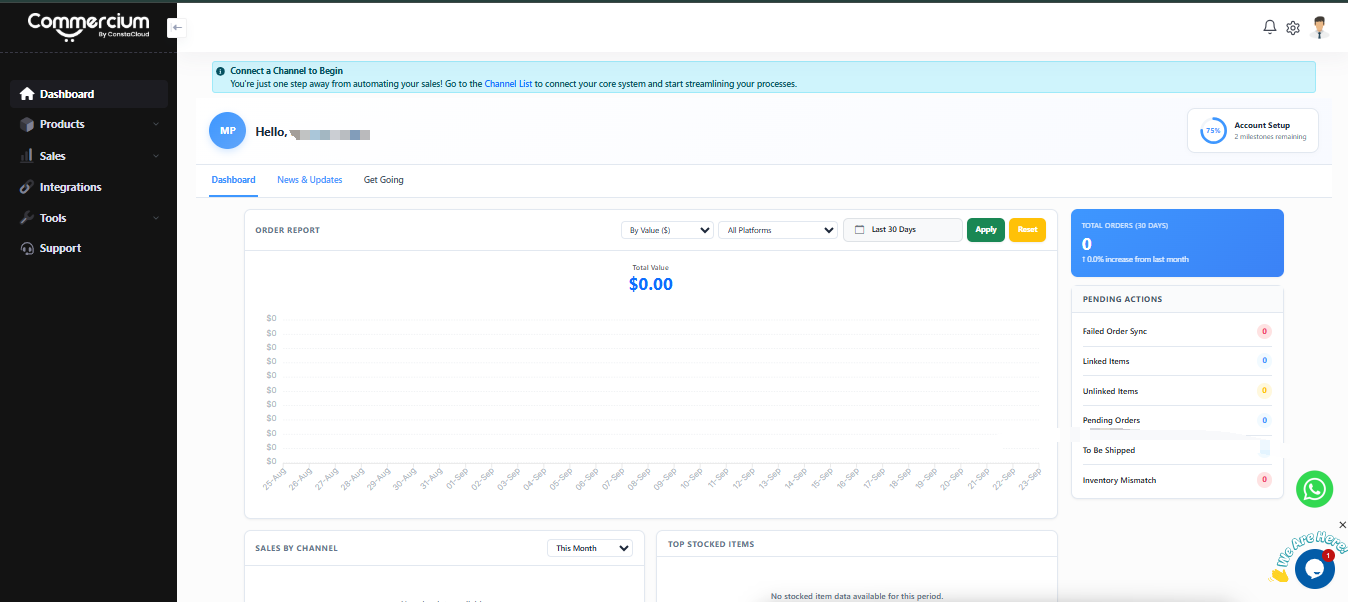
After logging in, you'll land on your Commercium dashboard. The left sidebar includes Dashboard, Products, Sales, Integrations, Tools and Support.
Connect Shopify in Commercium
Shopify is your source channel. Your products, stock and prices come from here, and Mirakl orders are created here.
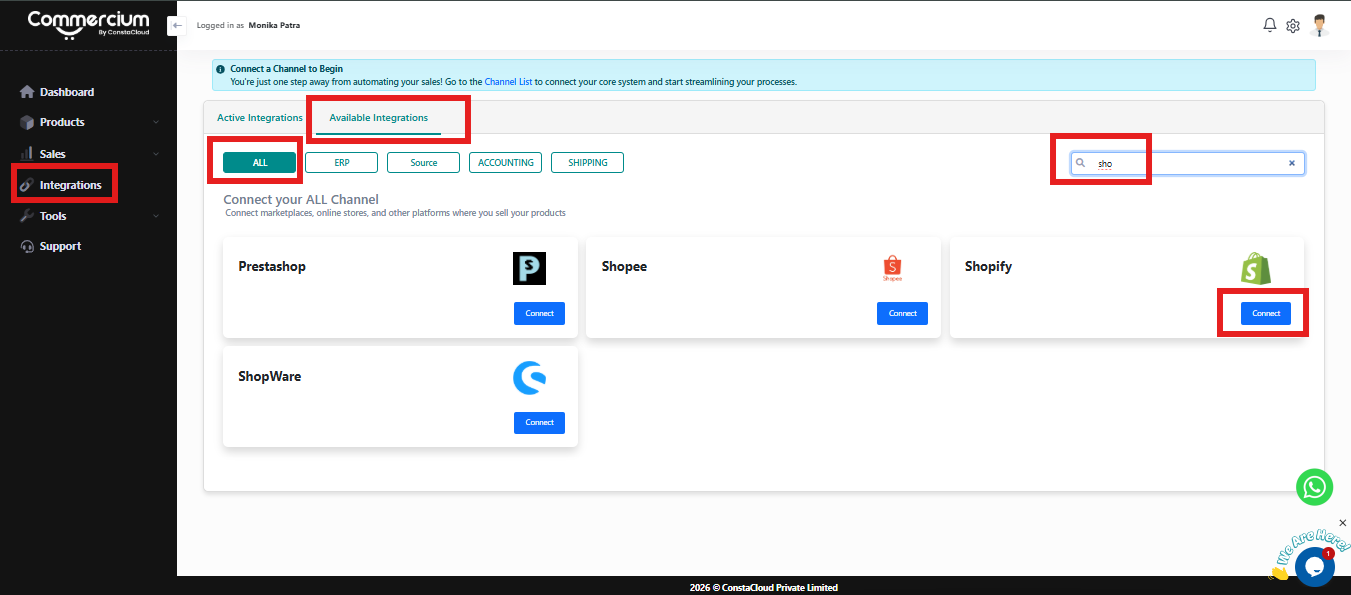
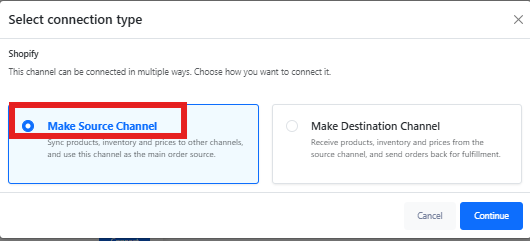
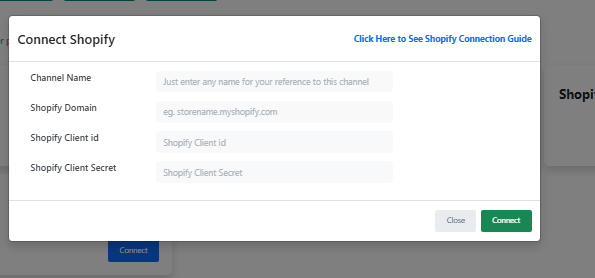
Once connected, Shopify appears under the Active Integrations tab.
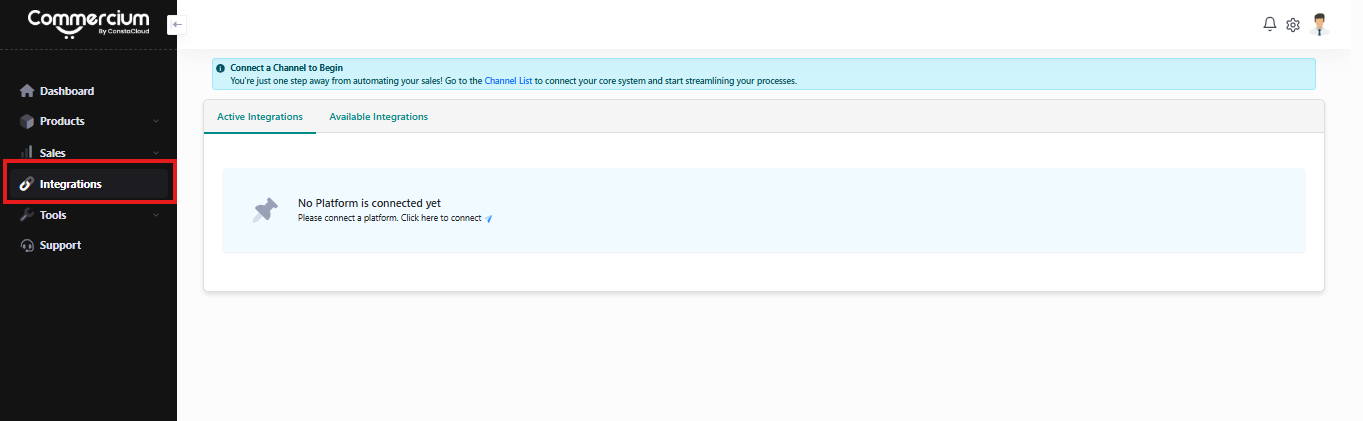
Connect Mirakl in Commercium
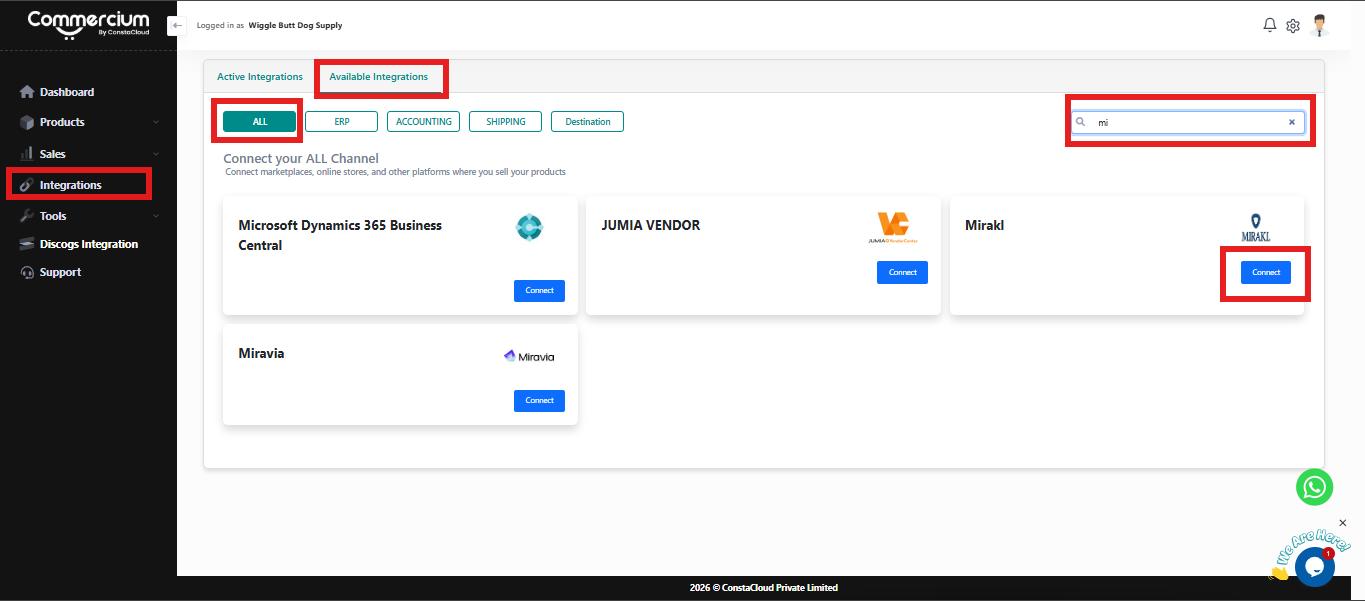
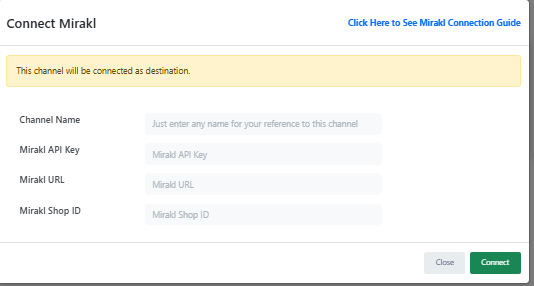
Nothing is published to Mirakl until you switch product sync on, so you can review everything first. Once connected, your Mirakl channel appears under the Active Integrations tab alongside Shopify.
Map catalogue, pricing & operations
We map it once so every listing and every order follows the same rules: product identity, stock buffers, pricing, order formats and shipping methods between Shopify and Mirakl.
Test, publish & go live
We publish a controlled batch of products first, then run a real order end to end before the full catalogue goes live. That means the order is imported into Shopify, fulfilled, and has its tracking pushed back to Mirakl. After go-live your sync is monitored, with alerts and a retry queue you can see.
Shopify and The Range, and what connecting them actually involves
One is your store: products, stock and your direct-to-consumer orders. The other is one of the UK’s biggest home, garden and leisure marketplaces, which moved from its in-house system onto Mirakl in 2026. The work of the combo sits in between.
Shopify GraphQL plus webhooks
Synced across both platforms
Typical onboarding time
Behind The Range marketplace
Shopify
Shopify is the hosted commerce platform behind millions of stores, from single-brand D2C sites to Shopify Plus enterprises. Products live as products with variants, stock is tracked as inventory levels per location, orders carry fulfilments and returns, and everything is reachable through the Admin API. For sellers moving onto The Range, it is already the cleanest stock and order system they own, which makes it the natural engine for a marketplace channel.
The Range
The Range is a British home, garden and leisure retailer with more than 280 stores across the UK and Republic of Ireland, part of the CDS Superstores group alongside Wilko and Homebase. Its online marketplace offers close to a million products, with third-party sellers carrying nearly half of online sales. In 2026 the marketplace moved from The Range’s in-house platform to Mirakl, so sellers now manage products, offers and orders through a Mirakl shop and its seller API.
Shopify Admin GraphQL API
Products, variants, inventory levels, locations, orders, fulfilment orders, returns and metafields.
Shopify webhooks
Change capture on products, inventory, fulfilments and orders so updates reach The Range without waiting for the next poll.
The Range products
Catalogue imports into The Range’s category hierarchy, with attribute and value-list mapping and per-SKU error reports.
The Range offers
Price, discount price, quantity, lead time to ship and logistic class per offer, updated as Shopify changes.
The Range orders
New orders listed, accepted or refused line by line, then downloaded with customer, shipping address and line items once payment clears.
The Range shipments
Carrier code and tracking submitted, then the shipment confirmed, including split shipments.
The Range refunds & cancellations
Operator refunds pulled into Shopify; line cancellations sent from Shopify when you cannot fulfil.
The Range catalogue structure
Category hierarchy, required attributes and value lists read from The Range so mappings stay current.
What we’ve learned integrating Mirakl for our users
Notes from live Mirakl operations across retail and B2B operators, and how each lesson became automation inside Commercium.
Acceptance windows decide your account health
Mirakl orders sit in a waiting-acceptance state and are auto-cancelled if you miss the operator’s window, which can be shorter than a working day. Acceptance and late-shipment rates then feed the operator’s seller scorecard.
Every operator is a separate integration wearing the same API
Sellers expect “we already support Mirakl” to mean plug-and-play. In practice each operator brings a different instance URL, API key, category tree, attribute set, value lists and carrier list. The API calls are familiar; the mapping is new every time. We keep mapping as reusable per-operator configuration so onboarding a new marketplace is days of setup, not another build.
Most rejections are value-list problems, not data-quality problems
Your catalogue can be perfectly clean and still be refused: the operator wants “Navy” where you send “Navy Blue”, a mandatory attribute exists only in that category, an image must be reachable at a public URL, or an identifier type isn’t accepted. Because imports are asynchronous, you only find out after polling the import and reading the error report.
Full feeds are expensive; deltas are fragile
Operators throttle imports and large full-catalogue pushes crowd out urgent price and stock updates. We run incremental offer updates on a fast cycle and reserve full reconciliation passes for a scheduled window.
Carrier codes are per-operator, not universal
Submitting a tracking number with a carrier code the operator doesn’t recognise means the shopper never sees tracking, and you get the contact. Each operator gets its own carrier and shipping-type mapping table.
Settlement only reconciles per operator
Commission rates differ by category and operator, and refunds and adjustments land in transaction logs at different times. We pull logs per instance and match them back to orders before anything reaches accounting.
Same brand, different country, different rules
An operator running several country marketplaces often has separate instances, currencies, tax handling, language requirements and lead times. We treat each as its own connection with shared source data.
Onboarding is a data project, not an API project
Most of the elapsed time on a first Mirakl go-live is catalogue readiness: attributes, media and identifiers, not authentication. We front-load a data audit so approval isn’t blocked by rejected products.
KPIs quietly gate your growth
Acceptance rate, late-shipment rate, cancellation rate and message response time influence visibility and account standing. We monitor them per operator and raise them as operational alerts, not monthly reports.
B2B orders arrive with a VAT invoice obligation
Many Mirakl operators run B2B alongside consumer sales, and those orders require a VAT invoice to be uploaded back to the operator before the order can settle cleanly. Commercium identifies B2B orders automatically and handles the VAT invoice upload for them.
Tax-inclusive or tax-exclusive is never one answer
When orders are written into Shopify or an ERP, some businesses need totals tax-inclusive and others need them exclusive. Commercium transforms order totals to tax-inclusive or tax-exclusive according to each customer’s preferred setting.
Working notes from our integration team. We update this section as operator requirements change.
Sell on Unlimited Channels Without Adding Connector Subscriptions
-
![check Icon]() 28-day Free Trial
28-day Free Trial
-
![check Icon]() No Credit Card Required
No Credit Card Required
-
![check Icon]() No Commitment
No Commitment
-
![check Icon]() Enterprise level security
Enterprise level security
 28-day Free Trial
Enterprise Pricing
(Note: This plan will only apply if you have one or more connected platforms that fall under the Enterprise category.)
Pro Seller Plan
99.95/Month
OR
999.50/Year
- 300 Orders Per month Push orders details with customer details, line items & tax data from connected channels to your primary sales channel. Note : Your primary channel orders will not be counted against your order limit.
- Unlimited SKUs Push products details like Title, Description & images from your primary channel automatically to other connected channels.
- Unlimited Channel Integrations Our software allows you to connect unlimited marketplaces & sell your products across all marketplaces to grow your revenue.
- Order Sync Automatically sync orders to connected platforms along with customer info, taxes & all other costs.
- Inventory Sync Automatically synchronize your inventory levels across all the sales channels.
- Product Listings Automatically publish and manage product listings across connected marketplaces from a single platform.
- Shipment Sync Carrier & tracking information back to order source automatically once the order is fulfilled.
- Product Updates Sync Product updates allows you to sync any product updates you perform inside your product source platform or Commercium to other connected destination platforms including price & any other product data updates. You can perform 5X the times of product updates per month of total SKU limit of your current plan.
- AI Data Enrichment Optimize listings with auto-rephrased content that follows sales channel rules while keeping your message clear and compliant.
- Unlimited Users You can add all of your team members to manage our software.
- Refunds & Cancellations Sync This feature saves a lot of time & hassles by automatically cancelling the order if it gets cancelled by the customer.
- Near Realtime Sync All our plans provide near-real-time sync speeds to avoid any inventory discrepancy.
- Virtual Bundles & Kits Create bundles or kits in Commercium without physically bundling stock. When a bundle sells, inventory is automatically adjusted for the underlying items across all connected channels.
- Automation Rules Define smart rules to automatically take action on orders, inventory, and statuses. For example: auto-route orders, auto-hold risky orders, auto-update inventory, or auto-change order status based on predefined conditions.
- Assisted Onboarding Our eCommerce expert will guide you step-by-step to get started, from setup to first sync, we’ll handle it with you.
- Priority Email Support We provide 24X7 Email support.
- Live Chat Support We provide 12x5 Live chat support.
- Live Chat Support Via WhatsApp We provide 12x5 WhatsApp chat support.
- Dedicated Account Manager Get personal support whenever you need. Your account manager is just a message away to help throughout your journey with us.
Pro Seller Plus Plan
149.95/Month
OR
1499.50/Year
- Pro Seller Plan &
- 600 Orders Per month Push orders details with customer details, line items & tax data from connected channels to your primary sales channel. Note : Your primary channel orders will not be counted against your order limit.
- Marketplace Settlement Sync Automatically import marketplace settlement reports and reconcile them with your orders, fees, refunds, and payouts. Get a clear view of what was sold, what was paid, and what was deducted without manual spreadsheets. Available for selected marketplaces.
Elite Seller
239.95/Month
OR
2399.50/Year
- Pro Seller Plus Plan &
- 1,200 Orders Per month Push orders details with customer details, line items & tax data from connected channels to your primary sales channel. Note : Your primary channel orders will not be counted against your order limit.
Elite Seller Plus Plan
399.95/Month
OR
3999.50/Year
- Elite Seller &
- 2,400 Orders Per month Push orders details with customer details, line items & tax data from connected channels to your primary sales channel. Note : Your primary channel orders will not be counted against your order limit.
Super Seller Plan
599.95/Month
OR
5,999.50/Year
- Elite Seller Plus Plan &
- 4,800 Orders Per month Push orders details with customer details, line items & tax data from connected channels to your primary sales channel. Note : Your primary channel orders will not be counted against your order limit.
Super Seller Plus Plan
1,099.95/Month
OR
10,999.50/Yearr
- Super Seller Plan &
- 9,600 Orders Per month Push orders details with customer details, line items & tax data from connected channels to your primary sales channel. Note : Your primary channel orders will not be counted against your order limit.
Custom Plan
Custom Pricing
OR
Contact For Pricing
- Super Seller Plus Plan &
- Orders Per month (As per your plan) Push orders details with customer details, line items & tax data from connected channels to your primary sales channel. Note : Your primary channel orders will not be counted against your order limit.


Note:
No forced upgrades. Continue on your plan and pay for extra usage that will be charged as per your current plan’s per order cost.
Your existing channel orders will not be deducted against your plan order limit.
Your Integration Costs Shouldn't Multiply as You Grow
Traditional integration software can turn every new channel into another subscription. Commercium is designed around one orchestration layer.
| As you grow | Traditional approach | Commercium |
|---|---|---|
| Add another marketplace | Buy another connector | Included |
| Add another store | Buy another connector | Included |
| Add warehouse / 3PL | Add another integration | Included |
| Add shipping systems | Add another integration | Included |
| Need routing & automation | Add more software | Included |
| Need centralized operations | Add an OMS | Built in |
Read Full Reviews

Shopify + The Range questions, answered
Technical questions about how the two platforms sync, and general questions about running on Commercium.
Can Commercium create products on The Range?
Can The Range orders be sent to my ERP?
Can Commercium help new The Range sellers?
Can I connect more than one seller account of The Range using Commercium?
What are the next steps to connect Shopify to The Range using Commercium?
Which flows does Commercium sync between Shopify and The Range?
Does The Range’s move to Mirakl affect my integration?
How are The Range orders accepted and created in Shopify?
How are The Range categories and attributes handled?
What happens if a product is rejected by The Range?
How are prices and promotions synced?
Which Shopify locations does The Range inventory come from?
How is tracking sent to The Range?
How do refunds and cancellations sync?
Is there a free trial available?
Can I sell on multiple marketplaces using Commercium?
You can connect and manage multiple sales channels through a single Commercium subscription without purchasing a separate connector for each platform. Some enterprise and ERP integrations may require a higher-tier plan.
Does every order I receive on any channel get counted against my plan order limit?
For example, if you already sell through Shopify and use Commercium to connect three additional marketplaces, only orders received from those three marketplaces count toward your Commercium order limit. Your existing Shopify orders are not counted unless Shopify is also connected to Commercium as a sales channel for order processing.
Most supported platforms can be added without a separate per-connector fee, provided they are covered by your current plan category.
How frequently does data sync happen between connected platforms?
What happens when I cross my plan limit?
You can also upgrade to a higher plan if you consistently exceed your plan limits, as higher-volume plans can cost less.
Can I connect my shipping platform with Commercium?
This allows you to send orders for fulfilment and synchronize shipment and tracking information with your connected sales channels.
Can I connect my ERP and accounting software with Commercium?
These integrations can synchronize products, inventory, pricing, orders, fulfilment information, and accounting data, depending on the capabilities of each connected system.
What kind of support does Commercium offer?
The support channels and service levels available may vary by plan.
Why are there three different types of pricing plans?
Ecommerce pricing applies when your setup includes only platforms classified as standard ecommerce integrations.
Enterprise pricing applies when your setup includes an enterprise marketplace, retailer, fulfilment network, or another platform classified as an enterprise integration.
ERP pricing applies when your setup includes an ERP system such as Business Central, Odoo, Acumatica, or NetSuite.
If your setup includes an Enterprise or ERP integration, the corresponding pricing category will apply. Our team can review your requirements and confirm the appropriate plan before you subscribe.
Connect through the Commercium app on the Shopify App Store, or with Admin API credentials you approve, plus your The Range (Mirakl) shop API key. Shopify stays the source of truth for products, stock and prices.
Customer Case Study



Commercium Is Enterprise Ready
We safeguard your data with advanced security measures, ensuring seamless operations and full compliance.
GDPR Compliant
Our platform is designed to support GDPR compliance through strong data protection and security practices.
SOC 2 Type II Audited
Independent SOC 2 Type II audit completed for Security, Availability, Processing Integrity, and Confidentiality. Report available under NDA upon request.
Strong Encryption
We encrypt data both in transfer and at rest with AES 256-bit encryption.
Multi-layered Firewall
We use multi-layered firewalls to safeguard our infrastructure, ensuring the security of your digital assets.
One platform. 200+ commerce connections. No per-connector fees.
Once you start using Commercium, you can connect almost any supported marketplace, store, ERP, POS, warehouse or fulfilment platform without purchasing separate integration software.
Connect More in a Few Clicks
Add marketplaces, stores, ERPs, POS systems and fulfilment partners without buying another connector.
Advanced Features Included
Get order routing, automation rules, AI product listings, repricing and virtual bundles with your integration.
Connect Online & In-Store
Bring ecommerce, brick-and-mortar stores and POS channels together in one connected operation.
Run your entire The Range marketplace channel straight out of Shopify
One Shopify store, one The Range Mirakl shop, and live product, inventory, order, shipment, refund, price and cancellation flows, usually live in 1–2 hours once your details are in place.
Bring your Shopify store, your The Range (Mirakl) shop details, the locations that hold marketplace stock and the categories you plan to list in.
Our Proud Customers


