
Get started

How inventory sync works

Connect your sales channels, sync stock in real time, and use thresholds and auto relisting to keep inventory accurate without manual work.

  1. 01

    Connect your sales channels

    Link Discogs, your ecommerce store, marketplaces, and POS systems inside Disconnect so inventory flows from one central place.

  2. 02

    Stock updates in real time

    When an item sells on any channel, quantities update everywhere automatically, helping prevent overselling across platforms.

  3. 03

    Set thresholds & auto relist

    Reserve buffer stock with threshold control and let Disconnect relist sold-out items on Discogs so listings stay active.

Everything in one place

Stay Accurate with Real-Time Inventory Everywhere.

Sync stock across platforms in real time and set smart thresholds to avoid overselling and manage inventory with confidence.

Inventory sync

Inventory Sync Across Platforms

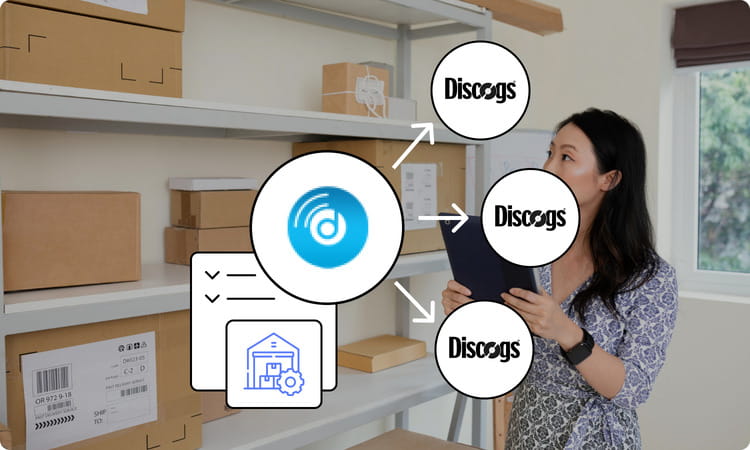
Inventory updates automatically across all connected platforms, so your stock stays accurate everywhere. If an item sells on Discogs, the quantity is automatically updated across all your connected platforms as well. This means you don't have to adjust stock manually on each channel, helping prevent overselling and keeping your inventory more reliable.

  • Stock updated automatically across all connected platforms
  • Sale on Discogs updates every channel instantly
  • Prevent overselling without manual adjustments
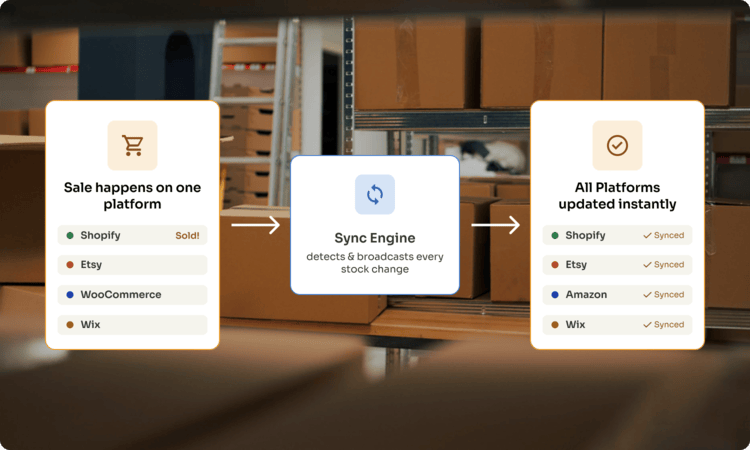
Inventory Sync Across Platforms
Threshold control

Inventory Threshold Control

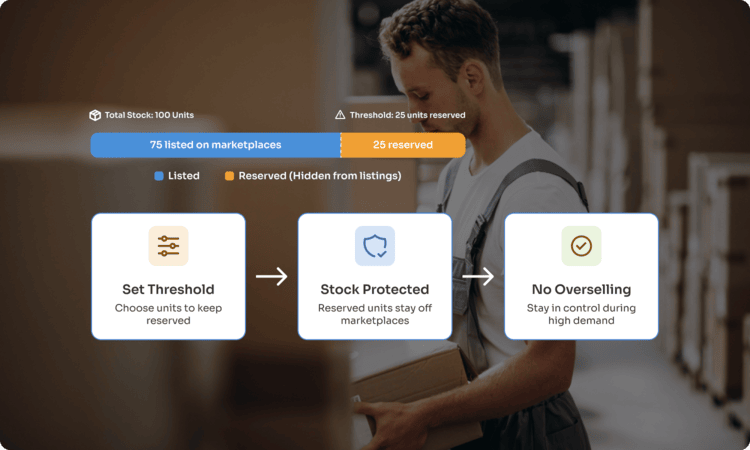
Set a minimum stock level to protect your inventory from overselling. DisConnect automatically keeps a reserved quantity aside and only shows the remaining stock as available for sale on marketplaces such as Discogs and eBay. For example, if you have 10 units in stock and set a threshold of 2, only 8 units will be listed, while 2 remain reserved.

  • Reserve a minimum quantity that stays off marketplaces
  • Only remaining stock shown as available for sale
  • Better control and reduced overselling risk
Inventory Threshold Control
Auto relisting

Discogs Auto Relisting

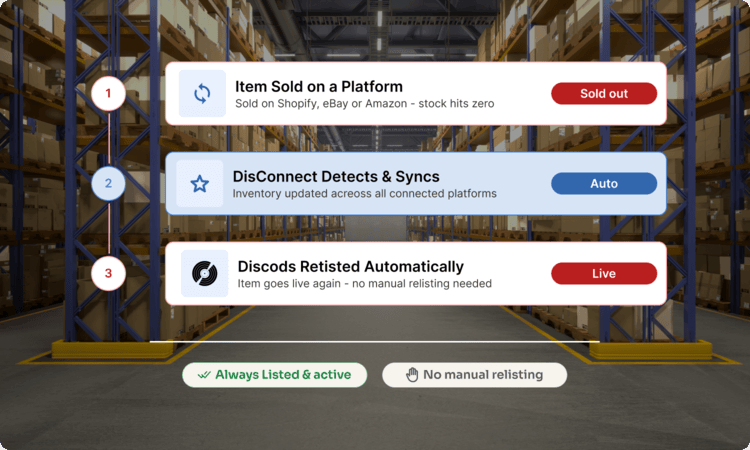
When selling across multiple platforms, keeping your Discogs listings accurate and active. DisConnect syncs inventory across connected platforms and automatically relists the items on Discogs once they get sold out, helping you avoid manual relisting and keep your listings available for sale.

  • Sync inventory across connected platforms
  • Automatically relist sold-out items on Discogs
  • Avoid manual relisting and keep listings active
Discogs Auto Relisting
Inventory sync

Manage stock across every sales channel

Record sellers use Disconnect to keep Discogs, ecommerce, marketplace, and POS inventory aligned, with threshold control and auto relisting built in.

Read Full Reviews

Trusted by sellers worldwide

Our proud customers

Official partners

We are official integration partners with

Questions

Frequently asked questions

How does inventory sync work across multiple platforms?
Inventory is automatically synced across all connected platforms. Whenever a product is sold on one platform, the stock is updated across others as well. This helps keep your inventory accurate without needing manual updates.
How does DisConnect help prevent overselling?
Since inventory is synced in near real time, stock levels stay consistent across platforms. This reduces the chances of selling the same item on multiple platforms when it's no longer available.
What is inventory threshold control?
Inventory threshold lets you reserve a portion of your stock that won't be listed on marketplaces. This gives you a buffer and helps avoid overselling, especially during high-volume sales.
Can I control how much inventory is shared with marketplaces?
Yes, you can decide how much stock you want to expose to marketplaces by setting a threshold. This gives you better control over how your inventory is distributed across channels.
Do I need to manually adjust inventory after each sale?
No, everything is handled automatically. Once a sale happens, inventory updates across all connected platforms, so you don't have to keep adjusting stock manually.

If you have any further questions regarding inventory management, get in touch with our friendly team

Talk to the Disconnect team

Fill in a few details and we'll help you plan the switch from spreadsheets to synced inventory, no obligation.

Email [email protected] Sales +1 (555) 014-2280
Support hours Mon-Fri, 9am-6pm UTC

Message sent

Thanks, we'll get back to you as soon as we can.