Get started

How the Discogs ShipStation integration works

Authorize Discogs and ShipStation, set your order sync rules, and Disconnect keeps fulfillment and tracking aligned.

  1. 01

    Connect Discogs & ShipStation

    Authorize your Discogs seller account and ShipStation inside Disconnect. Your shipping workflow is ready from day one.

  2. 02

    Set order sync rules

    Choose which Discogs order status triggers a sync to ShipStation so only the orders you want move into your shipping queue.

  3. 03

    Ship & notify buyers

    Process shipments in ShipStation and Disconnect updates Discogs order status, tracking and buyer notifications automatically.

Everything in one place

Discogs ShipStation Integration Salient Features

Features that fully automate your business and help you grow your revenue

Order sync

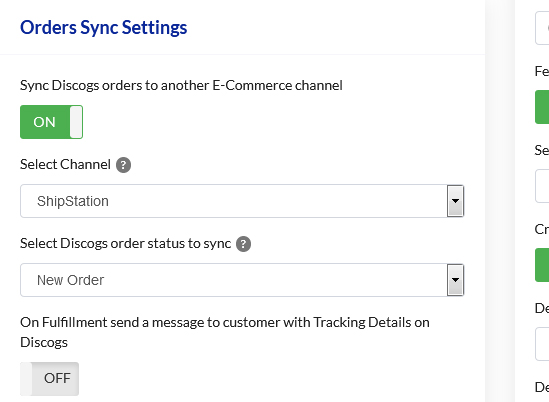
Automatically Sync Discogs Orders to ShipStation

Disconnect syncs your Discogs orders automatically to ShipStation, saving time from manually importing orders. Integrate Discogs with ShipStation and see your fulfillment run on automation.

  • Import Discogs orders into ShipStation automatically
  • Reduce manual order entry and copy-paste mistakes
  • Keep fulfillment moving without switching between tools
Automatically Sync Discogs Orders to ShipStation
Order rules

Sync Discogs Orders Based on Order's Current Status

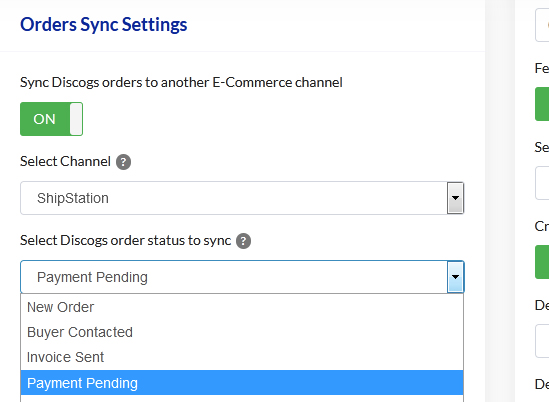
Choose which Discogs order status triggers a sync to ShipStation. Orders transfer only after they reach the status you select, so you stay in control of your workflow.

  • Sync orders only when they reach a chosen Discogs status
  • Avoid sending unpaid or unconfirmed orders to ShipStation
  • Set rules once and let Disconnect handle the rest
Sync Discogs Orders Based on Order's Current Status
Fulfillment

Automated Discogs Order Status Update when Shipped

Once an order is shipped via ShipStation, Disconnect can automatically update the Discogs order status to Shipped so buyers see accurate shipping information.

  • Mark Discogs orders as Shipped after ShipStation dispatch
  • Keep order status aligned across both platforms
  • Reduce manual status updates after every shipment
Automated Discogs Order Status Update when Shipped
Buyer updates

Automated Shipping Notifications

Once an order is shipped in ShipStation, Disconnect can automatically message your customer on Discogs with order and tracking details.

  • Notify Discogs buyers when orders ship
  • Share tracking numbers and links automatically
  • Keep buyers informed without manual messages
Automated Shipping Notifications
ShipStation

Discogs shipping integration for multi-carrier fulfillment

Record sellers use Disconnect to send Discogs orders to ShipStation automatically and keep shipment status and tracking accurate on every order.

Read Full Reviews

Trusted by sellers worldwide

Our proud customers

Official partners

We are official integration partners with

Frequently Asked Questions

  • Is DisConnect free to try ?

    DisConnect comes free for a period of 14 days with complete end to end set up & full demo and customer support. Following which there is a monthly recurring fee charged based on a pay as you grow model.
  • Do I need to add my card to get a free trial?

    Absolutely not. We don't require any of your billing details during the trial period. Only should you wish to upgrade, we will require your payment details.
  • Which E-Commerce sites & POS systems DisConnect integrates with?

    DisConnect Integrates with e-commerce sites like Shopify, WooCommerce, BigCommerce & Magento. The supported POS systems are SquareUp and Lightspeed POS.

If you have any further questions regarding Shipstation Discogs Integration, get in touch with our friendly team

Talk to the Disconnect team

Fill in a few details and we'll help you plan the switch from spreadsheets to synced inventory, no obligation.

Email [email protected] Sales +1 (555) 014-2280
Support hours Mon-Fri, 9am-6pm UTC

Message sent

Thanks, we'll get back to you as soon as we can.